Best Replit Alternatives in 2026
Compare the best Replit alternatives in 2026, including Layerwise, Lovable, Bolt, v0, Base44, Claude Code, and GitHub Codespaces, on models and pricing.
Table of contents
The best Replit alternative depends on which part of Replit you want to replace: the AI agent that builds your app, the cloud workspace it runs in, or the way you pay for both. This guide compares seven options, starting with Layerwise, which we make.
Replit combines an AI agent, a cloud development environment, a database, and hosting in one product. It also covers a wide range of projects, from web apps to mobile apps and slide decks. Some people want to choose the model that builds their app, keep project files on their own computer, try a no-code builder, or move to a coding setup they already know. Each tool below makes a different set of choices.
Published by Layerwise. Layerwise is our product, so it appears first. Competitor features and monthly starting prices were checked against official sources on November 28, 2026. Availability varies by plan and configuration.
Why people look for Replit alternatives
Replit is a capable platform. Its Core plan includes a cloud development environment, unlimited one-click publishing, and every artifact type Replit supports: web apps, mobile apps, data visualizations, slide decks, and animated videos.
People who compare alternatives usually point to a few product decisions:
- Model choice depends on the mode. Replit's Agent modes are Free Mode, Power Mode, and Max Mode. Free Mode always uses automatic model routing. Core and Pro builders can pick a model in Power or Max Mode, or let Auto choose.
- One pool of credits covers building and running. Core's monthly credits apply to Replit AI work, publishing, network transfer, database storage, and AI integrations. A busy month of building and a growing app draw from the same balance.
- The free plan has changed. Replit's Starter plan page says Starter is no longer available to new builders as of November 2026. New builders can try Core with a 3-day free trial instead.
- The project lives in the cloud. Replit runs your project in its cloud workspace. You can download a ZIP or connect a GitHub repository, but the workspace is the main place you build.
None of these is a problem for every project. If one of them matters to you, the options below handle it differently. For a detailed head-to-head, read Layerwise vs Replit.
Replit alternatives at a glance
| Tool | Best for | Model for building | Backend and hosting | Starting paid plan |
|---|---|---|---|---|
| Layerwise | Full-stack web apps built in a local workspace | Choose models across providers, or use Codex or Claude Code | Database, Storage, email auth, publishing, analytics, logs | Pro: $15/month |
| Lovable | Building and hosting web apps on one platform | Lovable selects the models | Built-in Cloud backend; free hosting | Pro: $25/month |
| Bolt | Building in the browser with nothing to install | Choose an agent; Bolt selects the models | Bolt Database and bolt.host hosting | Pro: $25/month |
| v0 by Vercel | Next.js apps deployed on Vercel | Model picker with v0 models | Vercel deployments; databases via Marketplace providers | Plus: $30/user/month |
| Base44 | No-code builders who want a managed backend | Auto by default; manual choice from Builder | Managed backend, authentication, and hosting | Starter: $16/month, annual |
| Claude Code | Developers working in their own repository | Choose Claude models | Your project's own services and deployment | Claude Pro: $20/month |
| GitHub Codespaces | A cloud dev environment for any repository | Bring your own coding agent | None built in; you deploy elsewhere | $0.18/hour for 2 cores |
| Replit (reference) | One cloud workspace for many kinds of projects | Auto in Free Mode; choose in Power and Max | Publishing and managed database, paid with credits | Core: $20/month |
Prices are monthly starting prices with monthly billing unless noted, checked on November 28, 2026. Credits, tokens, messages, and compute hours are different units, so equal prices do not buy equal amounts of work.
1. Layerwise: choose the model and build on your computer
Who it's for: People who want to build and publish a full-stack web app with AI, pick the model for each conversation, and keep the project's source files on their own computer. Typical projects include prototypes, internal tools, client portals, and small production services. If you're new to building this way, vibe coding explains the approach.
What it does well: Layerwise is a desktop app with a model picker covering supported families including Claude, GPT, Gemini, DeepSeek, and Kimi. The model directory lists model names, providers, capabilities, and prices, and the Usage view records the model, tokens, and cost of each AI request.
You can also build with a plan you already pay for. Choose My Codex to run a chat on the Codex in your ChatGPT plan, or My Claude to run it on the Claude Code in your Claude plan. Those chats don't use Layerwise credits, and any chat can switch between Layerwise, My Codex, and My Claude at any time while keeping its history. Both work on every Layerwise plan, including Free. See the Codex guide and the Claude guide.
The assistant, a local preview, and the built-in editor all work on the same project files. You can open that folder in another editor or terminal, export a ZIP, or connect a GitHub repository.
Each project includes a dedicated database, Storage for images and other files, email authentication, transactional email, publishing, analytics, and server logs for local and published requests. Paid plans add scheduled tasks for work like daily reminders or cleanup, and custom domains.
Database
Store app data. Browse and edit your tables.
Authentication
Sign-in, verification, and password reset emails.
Publishing
Deploy a release and get a live URL to share.
Custom domains
Give your published app an address of its own.
Analytics
See visits, popular pages, and traffic sources.
Server logs
Inspect backend requests and follow logs live.
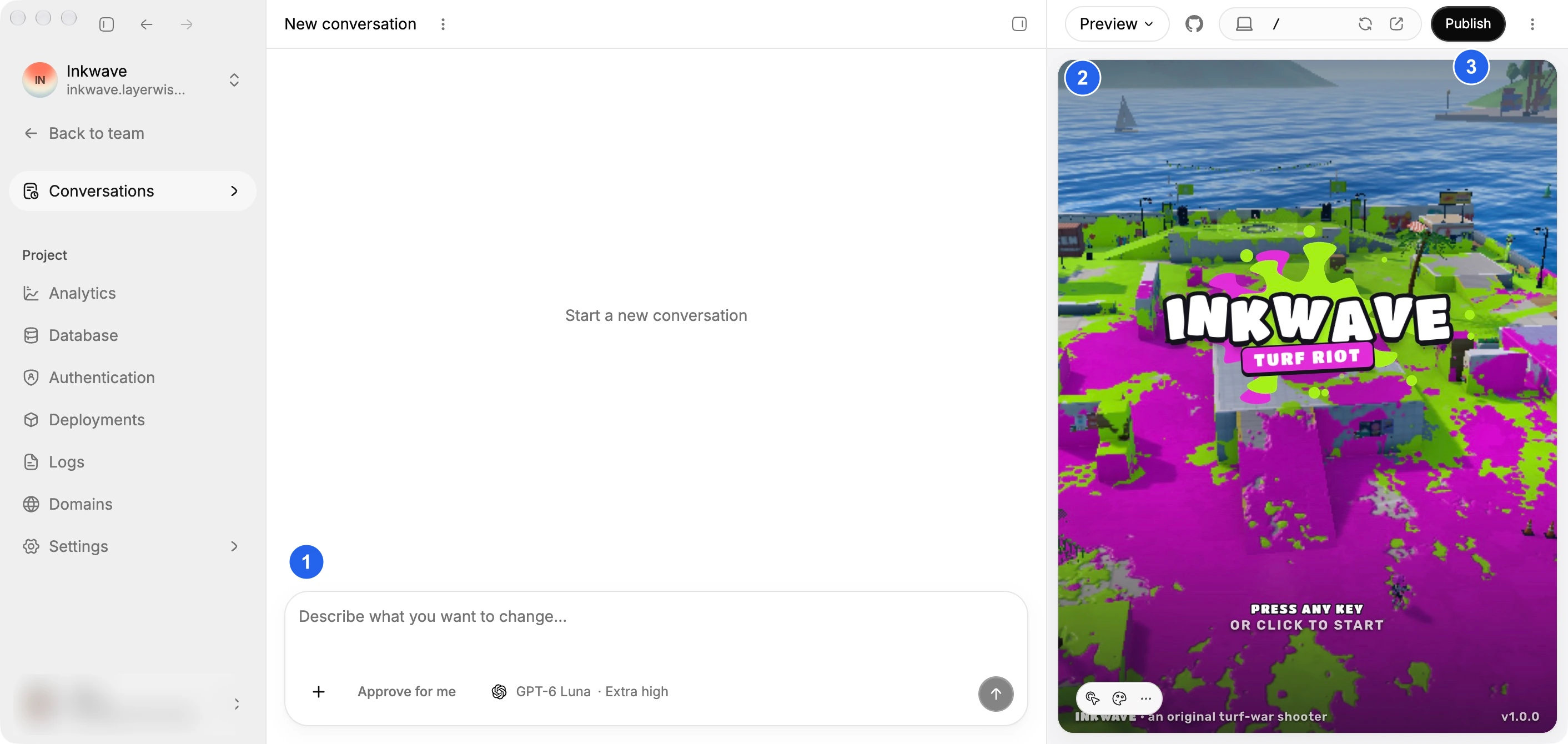
Trade-offs vs Replit: Layerwise focuses on full-stack web apps. If you need native mobile apps, slide decks, or code in many languages, Replit covers more ground. Layerwise is a desktop app, and the local workspace needs to stay available until publishing completes. Its built-in authentication is email-based: sign-in, verification, and password reset.
Like Replit, one balance pays for AI and for what your published apps use. If credits run out, published apps switch to read-only: pages keep loading, while sign-ins, form submissions, uploads, and email pause. Read-only apps can use up to $1 of usage a month on us before they pause.
Starting price: Free is $0 with $5 in monthly credits, 10 public projects, up to 10 messages a day, and open-weight models including GLM, Kimi, MiniMax, and DeepSeek. Pro is $15/month with $15 in monthly credits and adds advanced closed-weight models. Business is $30/month with $30 in credits and adds frontier models. Plans are priced per team: Pro includes up to 10 members, and Business includes unlimited members. See Layerwise plans.
2. Lovable: build and host web apps on one platform
Who it's for: People who want to describe a web app and have building, backend, and hosting handled in one browser-based product.
What it does well: Lovable's built-in backend, called Cloud, includes a database, storage, authentication, realtime, and functions, and hosting a published app is free. Lovable also has a guided import with steps for Replit projects. It rebuilds the app as a Lovable project and moves the tables and users to its backend. Database records come over separately, and imported users set a new password at their next sign-in.
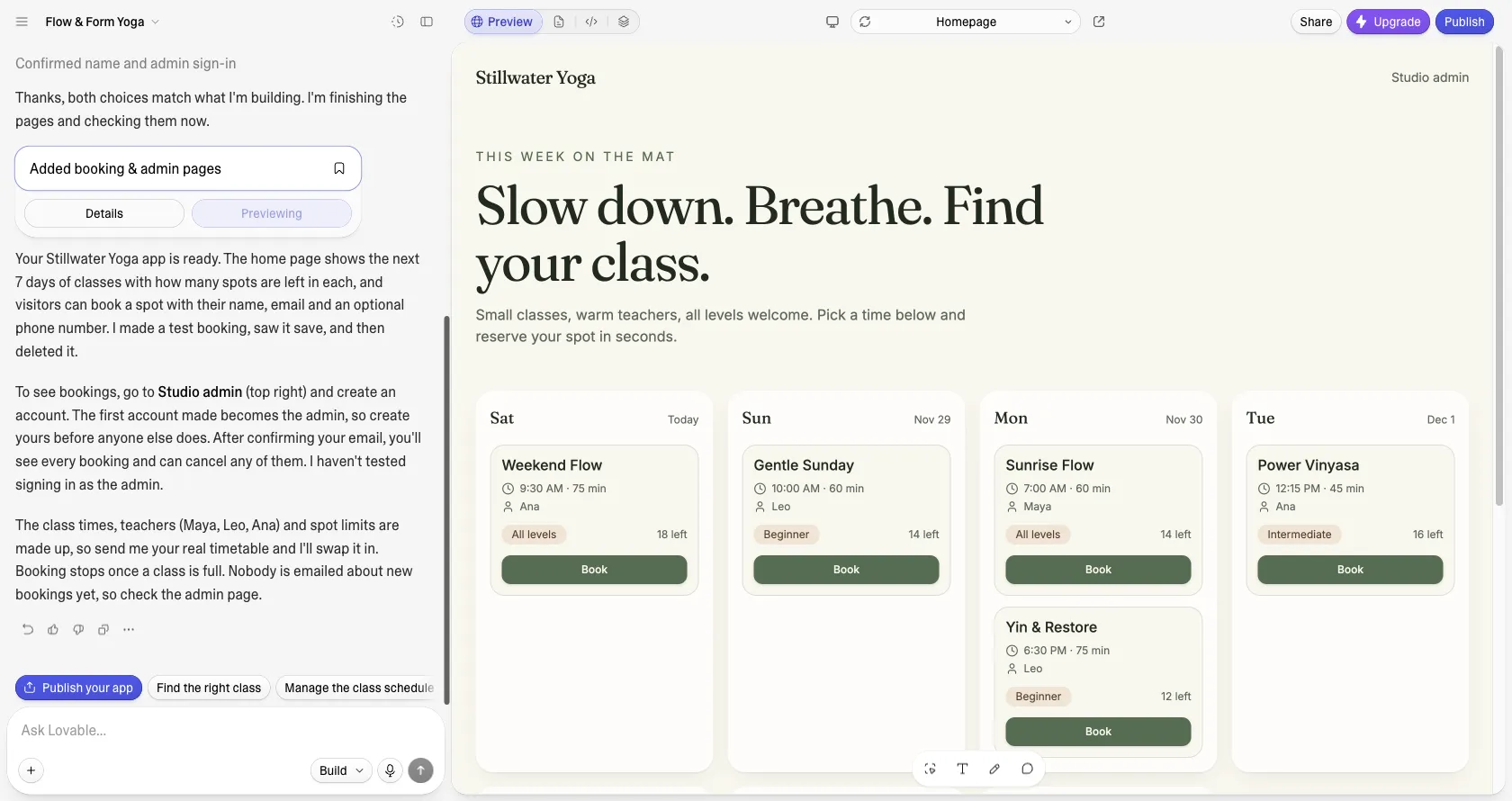
Trade-offs vs Replit: Lovable chooses the model for building. Its FAQ says you cannot pick a specific model for Build, Plan, or Chat modes. Replit at least lets paid builders choose in Power and Max Mode.
Lovable shares Replit's single-balance approach: Cloud usage draws from the same credits as building. Its credits documentation explains that when credits run out, building stops, AI features in deployed apps stop working, and apps that use Cloud pause. Git sync works on every plan, though connecting GitHub creates a new repository rather than linking an existing one. Codebase download requires a paid plan.
Starting price: Free includes 5 daily build credits, up to 30 a month, plus 20 Cloud credits. Pro is $25/month with 100 monthly credits, according to Lovable pricing. For a wider comparison, see Best Lovable Alternatives.
3. Bolt: build in the browser with Bolt Cloud
Who it's for: People who want nothing to install and a backend that sets itself up when the project needs one.
What it does well: Bolt Database is built in on every plan. It covers tables, authentication with email and Google sign-in, file storage, server functions, and logs. Pro and Teams users can use a database in their own Supabase account instead. Bolt hosting publishes to a free bolt.host address.
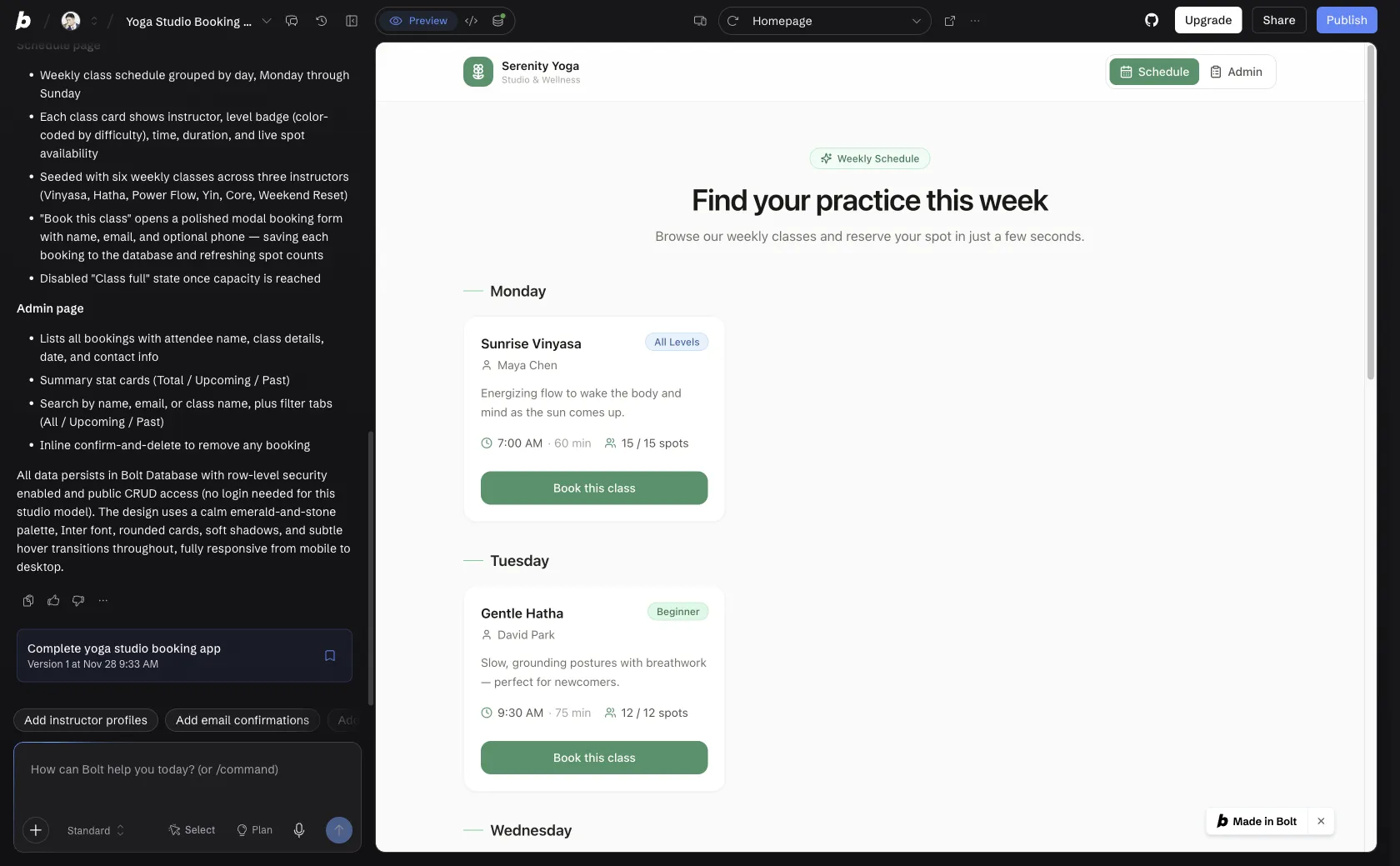
Trade-offs vs Replit: Bolt offers two build agents, Standard and Max, and selects the underlying models for you. The free plan includes only Standard. Custom domains require Pro.
Bolt measures usage in tokens. When a site reaches its plan's hosting limit, it stops displaying publicly until usage resets at the start of the next billing cycle, so check the limits before you launch something busy.
Starting price: Free includes 1M tokens per month with a 300K daily limit. Pro is $25/month and starts at 10M tokens per month with no daily limit, according to Bolt pricing. Read Layerwise vs Bolt for more detail.
4. v0 by Vercel: Next.js apps on Vercel
Who it's for: Designers, engineers, and founders who want to build with Next.js and deploy on Vercel.
What it does well: v0 defaults to Next.js and deploys to Vercel, with preview URLs for work in progress and a stable production URL. Its model picker sits in the chat composer, and the pricing page lists per-token prices for v0 Mini, v0 Pro, v0 Max, and v0 Max Fast.
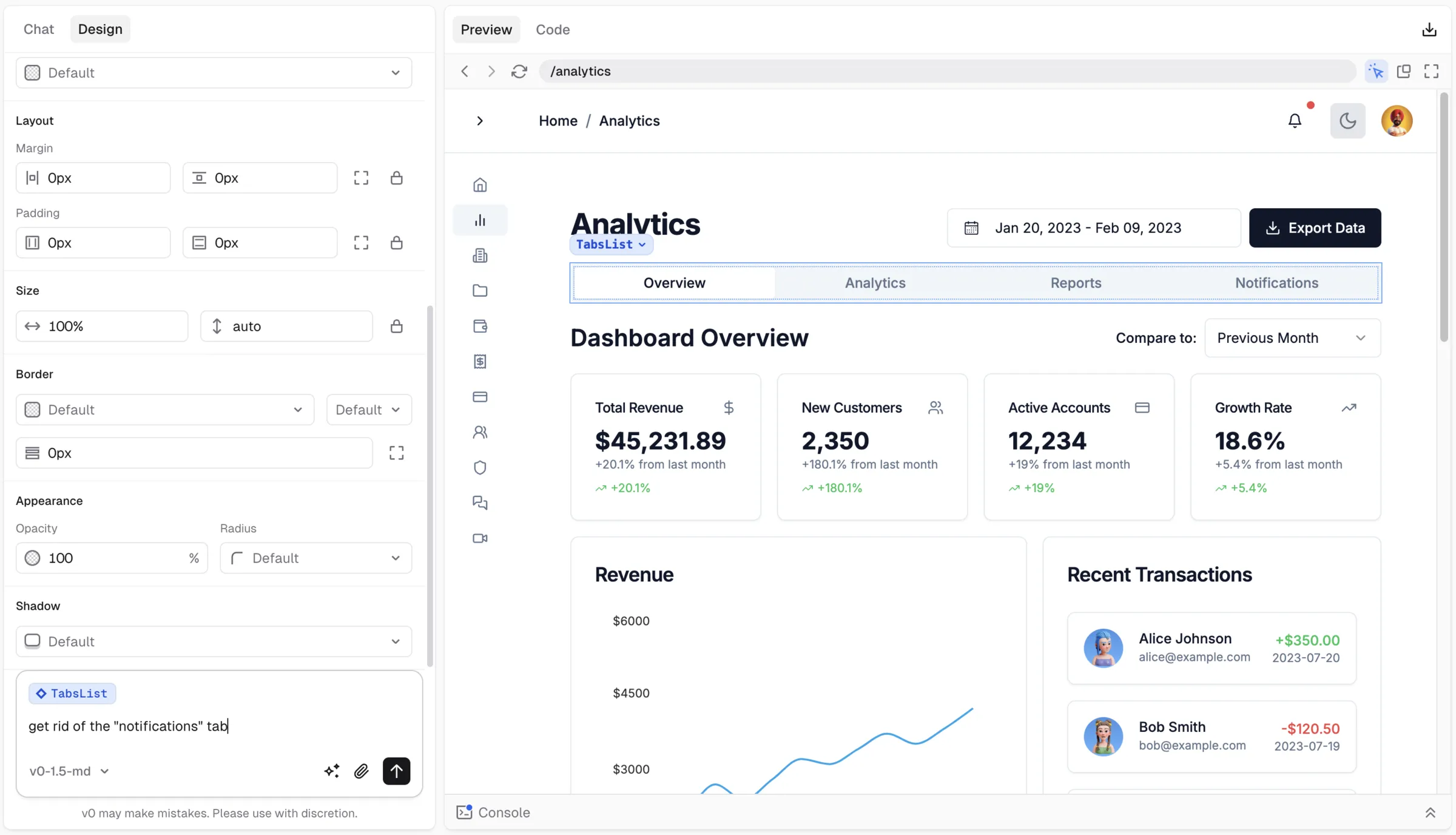
Trade-offs vs Replit: v0 adds databases through Vercel Marketplace integrations such as Neon, Supabase, Upstash, and Vercel Blob. Adding one provisions an account with that provider, rather than using a single built-in database. Adding custom models from the AI Gateway catalog is available to Enterprise teams. Paid plans are priced per user.
Starting price: Free is $0 with a 7-message daily limit, and new users get $5 in one-time credits. Plus is $30/user/month with $30 in monthly credits per user, plus $2 in daily credits on login, according to the v0 pricing docs. For a closer look, read Layerwise vs v0.
5. Base44: a no-code builder with a managed backend
Who it's for: People who would rather not look at code and want the database, sign-in, and hosting handled for them.
What it does well: Base44 includes a managed backend, authentication, and hosting. Its pricing page lists authentication, a database, and analytics on the Free plan, which covers up to 5 apps. The AI chat has a Build mode that acts on your prompts right away and a Discuss mode for planning changes before any code changes.
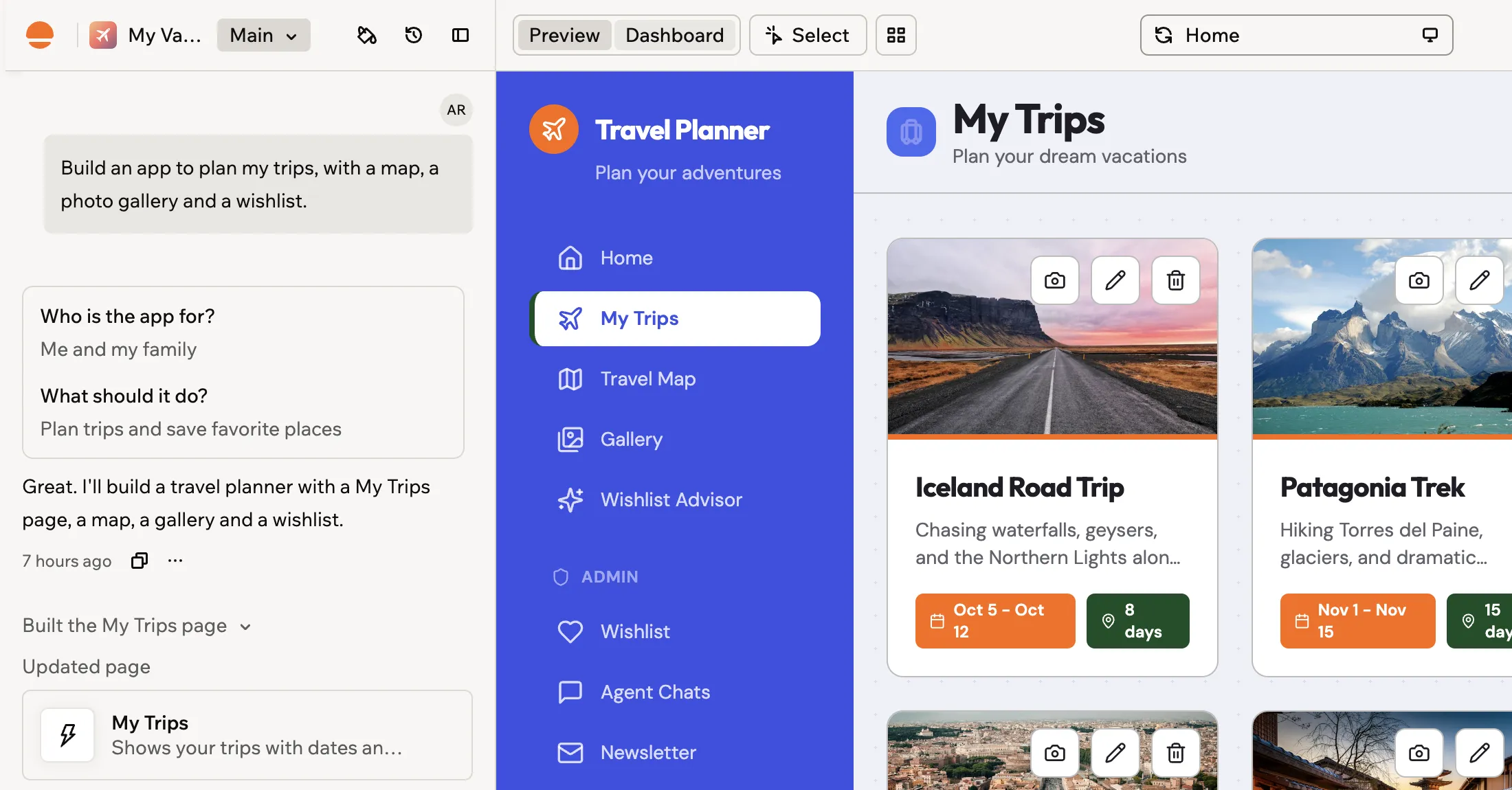
Trade-offs vs Replit: Base44 matches each request with a model automatically. Choosing a model yourself requires the Builder plan or higher, which is also where GitHub integration starts. Plans include two allowances, message credits and integration credits, and the pricing page lists annual prices.
Starting price: Free includes 25 message credits and 100 integration credits per month. Starter is $16/month billed annually, with 100 message credits and 2,000 integration credits. Builder, the first plan with model selection, is $40/month billed annually.
6. Claude Code: a coding agent for your own stack
Who it's for: Developers who already have a repository, a deployment process, and services they like, and who used Replit mainly for its agent.
What it does well: Anthropic describes Claude Code as an agentic coding tool that reads your codebase, edits files, runs commands, and integrates with your development tools. It runs in the terminal, in IDEs such as VS Code and JetBrains, in a desktop app, and in the browser. It connects to other tools through MCP and works directly with Git.
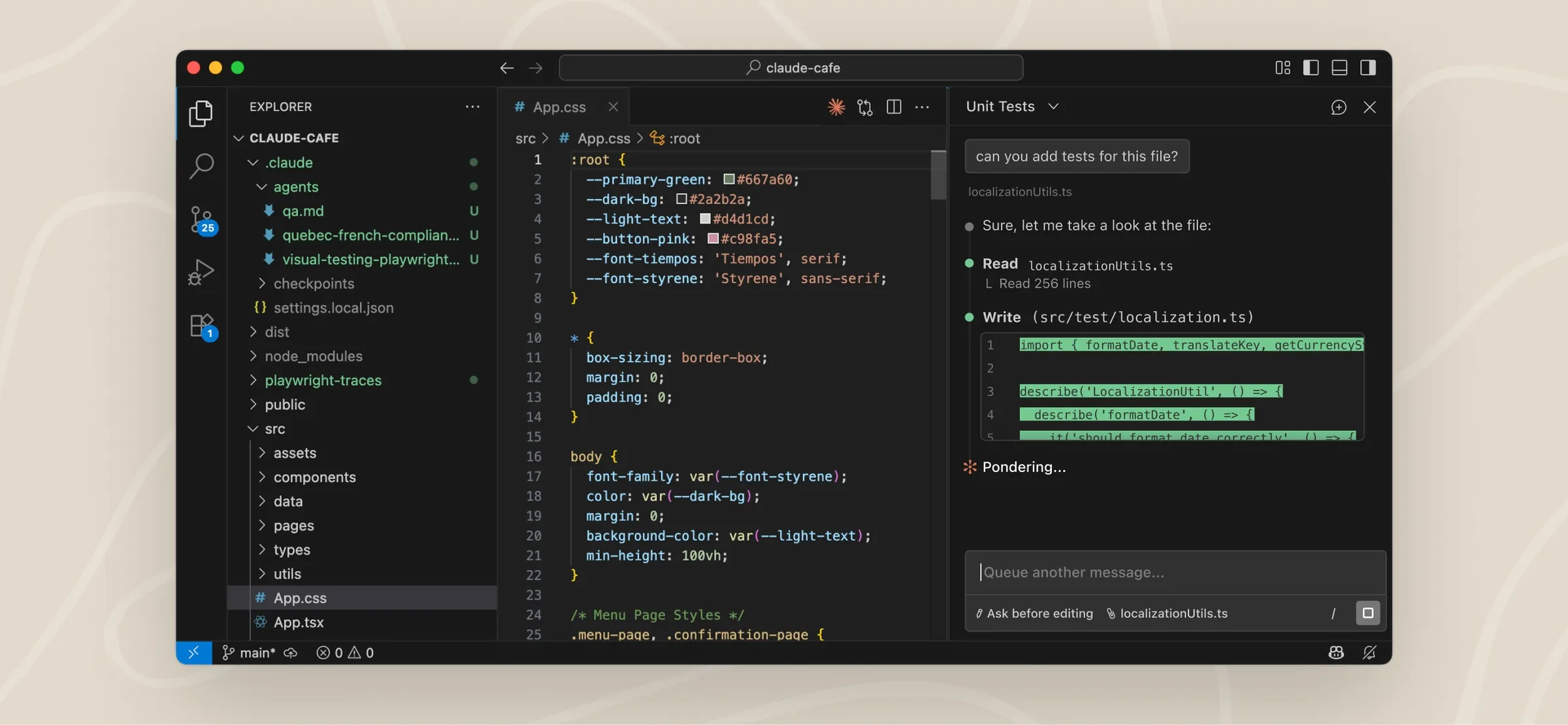
Trade-offs vs Replit: Claude Code is not a hosted app builder. You choose and connect your database, authentication, hosting, and monitoring yourself. That flexibility suits established projects, but a new app takes more setup than it does in Replit.
Starting price: Claude Code is included in the Claude Pro plan at $20/month billed monthly, or $17/month with annual billing, according to Claude pricing. It is not included in the Free plan.
If you like Claude Code but want a database, sign-in, preview, and publishing around it, Layerwise can run it through My Claude, so those chats draw on your Claude plan. See how Layerwise works as a Claude Code GUI, or read Layerwise vs Claude Code.
7. GitHub Codespaces: a cloud dev environment for any repository
Who it's for: Developers who liked Replit's ready-to-code cloud workspace and want the same thing for a GitHub repository.
What it does well: A codespace is a development environment hosted by GitHub in a Docker container on a virtual machine. You can connect from a browser, Visual Studio Code, or the GitHub CLI, and machine types range from 2 cores and 8 GB of RAM up to 32 cores and 128 GB. Committing dev container configuration to a repository gives everyone on the project the same environment.
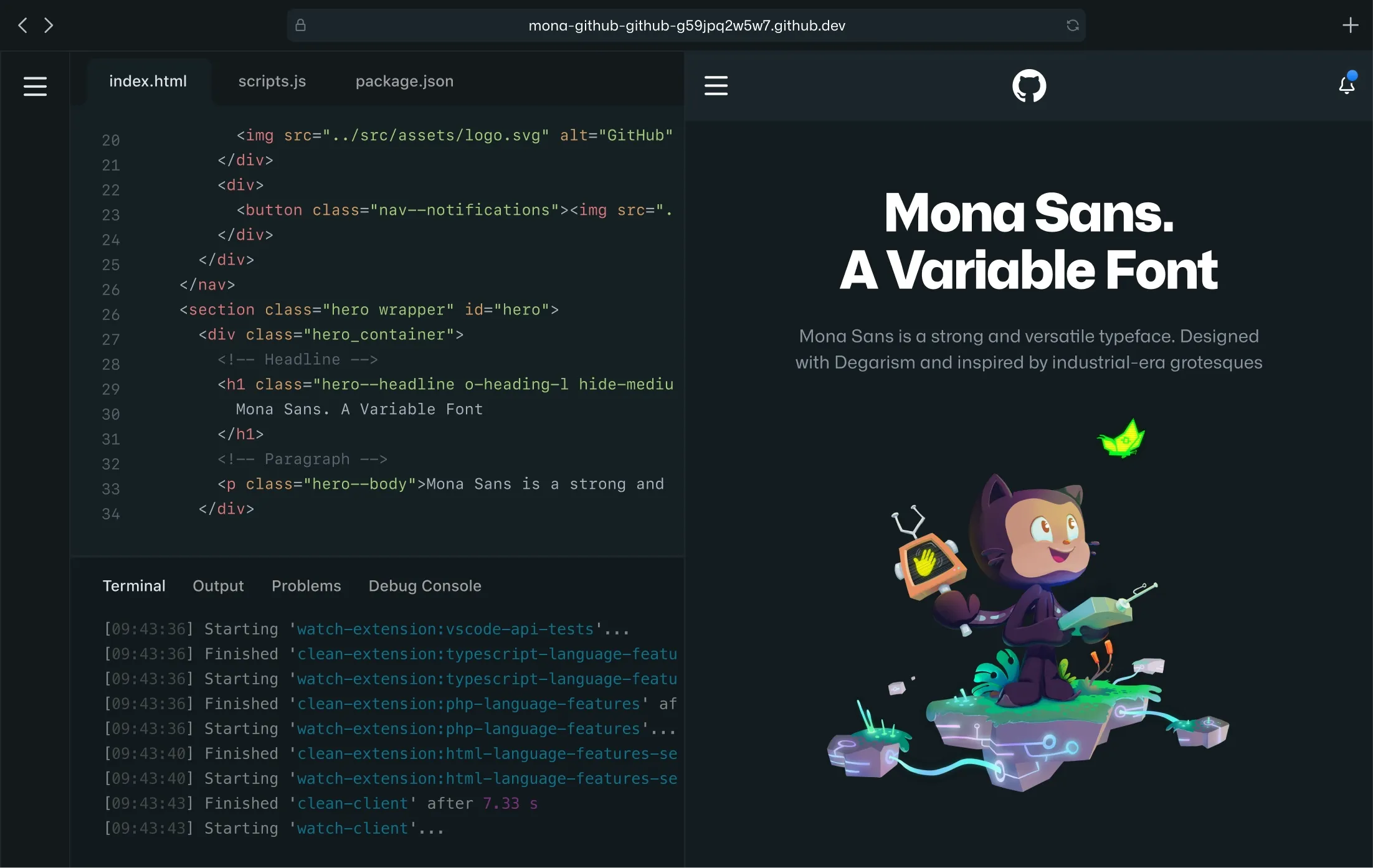
Trade-offs vs Replit: Codespaces is a workspace, not an app builder. It has no built-in database or hosting, so you set up and deploy those yourself. Forwarded ports let you open your running app for testing and debugging, and you can share one with a public URL, but they aren't a production hosting option. For AI help, you bring your own coding agent.
Starting price: Personal accounts get a monthly free quota: 120 compute hours and 15 GB-month of storage on GitHub Free, and 180 compute hours and 20 GB-month on GitHub Pro. Beyond that, a 2-core machine costs $0.18 per hour and storage costs $0.07 per GB-month, according to GitHub's Codespaces billing docs.
How to choose a Replit alternative
Start with the reason you're leaving or comparing:
- You want to choose the building model and see token prices: Layerwise lets you pick across providers on every plan. v0 publishes token prices for its own models, and Base44 allows manual model selection from Builder.
- You want to build with a plan you already pay for: Layerwise runs chats on your ChatGPT plan through My Codex or your Claude plan through My Claude. Claude Code works directly in your own repository.
- You want project files on your computer: Layerwise builds in a local workspace. Claude Code works in the repository you already have.
- You want to stay in the browser: Lovable, Bolt, v0, and Base44 all work as hosted builders. Codespaces gives you a browser-based editor for your own repository.
- You want to bring a Replit app with you: Lovable has guided import steps for Replit projects. For other tools, start from Replit's ZIP download or a connected GitHub repository.
- Your app runs on Next.js and Vercel: v0 fits that stack most closely.
- You prefer no-code with a managed backend: Base44 is designed for that.
- You want a live app's pages to keep loading when credits run out: Layerwise switches published apps to read-only, so pages keep working while saving pauses.
- You build native mobile apps, slide decks, or code in many languages from one workspace: Replit may still be the right fit.
If your main goal is a marketing site or portfolio rather than an app, our AI website builder page covers that use case.
Compare what each starting plan includes
| Starting paid plan | Monthly price | Included usage |
|---|---|---|
| Layerwise Pro | $15 | $15 in monthly credits, shared with hosting |
| Lovable Pro | $25 | 100 monthly credits, plus daily build credits and Cloud credits |
| Bolt Pro | $25 | Starts at 10M tokens per month, with no daily limit |
| v0 Plus | $30 per user | $30 in monthly credits per user, plus $2 in daily credits on login |
| Base44 Starter | $16, billed annually | 100 message credits and 2,000 integration credits per month |
| Claude Pro | $20 | Includes Claude Code |
| GitHub Codespaces | Pay as you go | Free monthly quota, then $0.18/hour for a 2-core machine |
| Replit Core | $20 | $20 toward more powerful models, plus up to 30 hours of Free Mode chat |
These allowances use different units. A dollar of credits, a token, a message credit, and a compute hour don't represent the same amount of building work, so compare plans by running the same task.
Test a representative feature
Pick your top two choices and build the same small feature in each: a form that saves data, a sign-in, and a published URL. Check that it works with a second account, then review what the task cost. That tells you more than any feature list.
Frequently asked questions
What is the best Replit alternative?
It depends on what you want to change. For model choice, local files, building on your ChatGPT or Claude plan, and built-in app services, try Layerwise. For an all-in-one browser builder, try Lovable or Bolt. For Next.js on Vercel, try v0. For no-code, try Base44. For an existing codebase, try Claude Code, and for a cloud workspace around a GitHub repository, try GitHub Codespaces.
Is there a free Replit alternative?
Yes. Layerwise Free includes $5 in monthly credits, 10 public projects, and up to 10 messages a day with open-weight models, and My Codex and My Claude chats run on your own ChatGPT or Claude plan. Lovable, Bolt, v0, and Base44 also have free plans with daily or monthly limits. GitHub Codespaces includes a free monthly quota for personal accounts. Replit's free Starter plan is no longer available to new builders as of November 2026.
Is there a cheaper alternative to Replit?
Layerwise Pro starts at $15/month, compared with $20/month for Replit Core, as of November 28, 2026. Base44 Starter is $16/month billed annually. Each product measures usage differently, so the total cost depends on the model, how many iterations the app takes, and the services it uses once it's live.
Which Replit alternatives let me choose the AI model?
Layerwise lets you choose supported models across providers for each conversation, or use the models in your Codex or Claude Code account. v0 has a model picker with its own models, and Base44 allows manual selection from its Builder plan. Claude Code uses Claude models. Lovable and Bolt select the models for you.
Can I move my Replit project to another tool?
Replit lets you download a project as a ZIP or sync it with a GitHub repository. Lovable has guided import steps for Replit projects. Moving the database, user accounts, and hosting to another provider usually takes extra work, so test the moved app before switching your users over.
Is Replit good for beginners?
Yes. Replit handles setup, hosting, and the database in one place. Many beginners also like Layerwise, Lovable, Bolt, and Base44, which start from a description of the app and include a backend. Claude Code and Codespaces suit people who are comfortable with code and their own deployment.
To try the full Layerwise workflow, follow the quick start or read Build a Full-Stack Web App with AI.
YOUR NEXT PROJECT
Give your idea a live URL.
Choose your model, build in a live preview, and publish with your project’s backend connected.
Download LayerwiseBuild your first app