Layerwise vs Bolt
Layerwise vs Bolt: compare model choice, tokens and credits, local files, backend services, analytics, and pricing to pick the right AI app builder.
Table of contents
Layerwise is a Bolt alternative for people who want to choose the AI model that builds their app, see what each request costs, and keep the project files on their own computer. Bolt is a strong choice when you want to start in a browser with nothing to install, or when you need a mobile app.
Layerwise and Bolt both turn a description into a working full-stack app. Both include a database, sign-in, and a published URL without separate accounts to set up. The differences show up in where the project runs, how the model is chosen, and how usage is measured.
This Layerwise vs Bolt comparison covers those decisions, including backend services, analytics, logs, and pricing.
Published by Layerwise. Competitor features and monthly starting prices were checked against official sources on October 11, 2026. Features marked Coming soon are in development. Availability varies by plan and configuration.
Layerwise vs Bolt at a glance
| What matters | Layerwise | Bolt |
|---|---|---|
| Where you build | Desktop app with local project files and preview | Browser app on WebContainers; nothing to install |
| AI model for building | Choose supported models across providers | Choose the Standard or Max agent; Bolt selects the models |
| Usage unit | AI credits charged at each model's token prices | Monthly token allowance; Free also has a daily cap |
| What you can build | Full-stack web apps | Websites, web apps, and mobile apps through Expo |
| Database and sign-in | SQLite database and email auth in every project | Postgres-based Bolt Database, email and Google sign-in |
| Traffic analytics | Every plan; UTM reports, CSV export, and email summaries | Paid plans; up to the last 30 days |
| Server logs | Local and Online request logs with live updates | Database logs by type, including server functions |
| Starting paid plan | Pro: $15/month | Pro: $25/month |
| Own Codex / Claude Code | Coming soon: use your local agent and account allowance | Builds use Bolt tokens; MCP servers add context from your tools |
The model row describes the agent that builds your app. Models used by AI features inside the finished app are a separate choice.
Bolt runs in your browser; Layerwise runs on your computer
Bolt runs on WebContainers, StackBlitz's technology for running a development environment inside the browser. There is nothing to install, and the FAQ notes that it works the same way on Windows, Mac, or other operating systems. Bolt supports Chromium-based browsers and Safari, with hosted previews and read-only Code view in Safari.
That is a real advantage when you want to try an idea on any computer with a supported browser. You can edit files in Bolt's Code view, download a project as a ZIP, or sync it with GitHub.
Layerwise is a desktop app for macOS, Windows, and Linux. It creates real project files on your device, and the assistant, built-in editor, and local preview use the same workspace. You can open that folder in an installed editor or terminal, make a change yourself, and check it in the preview.
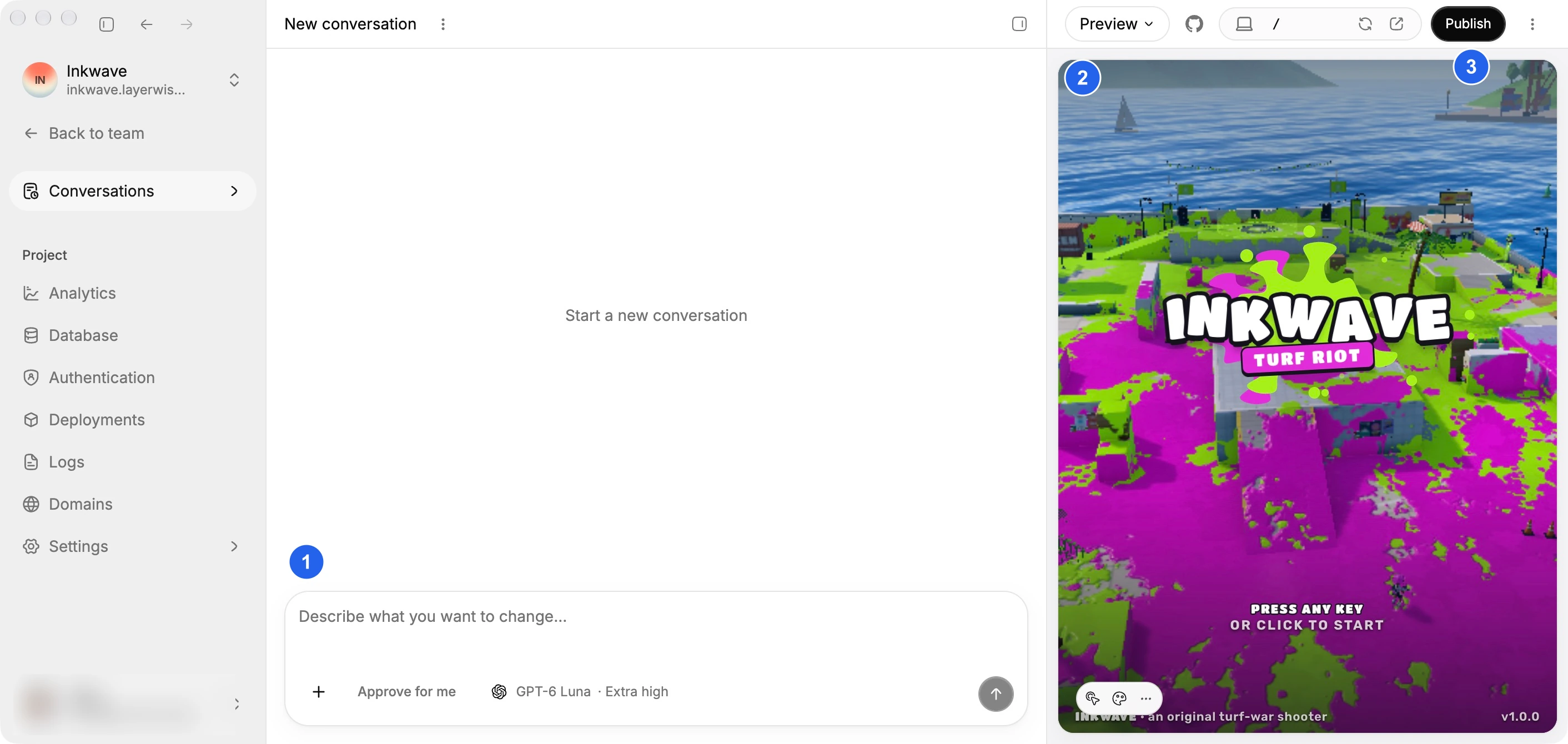
The code and GitHub guide covers opening the workspace elsewhere, ZIP export, and creating a connected repository. Local development still uses online AI services for model requests.
Choose the model, not only the agent
Layerwise gives you a model picker with supported families including Claude, GPT, Gemini, DeepSeek, and Kimi. Free includes supported open-weight models, and paid plans add advanced models from providers such as Anthropic, OpenAI, and Google. Choose an available model when creating a project or starting a conversation.
The Layerwise model directory lists model names, providers, capabilities, and prices, so you can compare options before spending credits. Try a lower-priced model for a small change, or choose another supported model for a difficult feature.
Bolt lets you choose an agent: Standard for everyday building or Max for complex tasks. Its documentation says Bolt handles model selection behind the scenes. Max is not available on the Free plan.
Bolt has also tested Bolt Forge, a research-preview agent where you select specific open-source models. Check its documentation for current availability and data-use terms.
This is a difference in control. Bolt matches its agents to the kind of work. Layerwise lets you pick the specific model for each conversation.
Tokens vs credits: how each product measures usage
Bolt measures usage in tokens. Its documentation explains that most token usage comes from reading and syncing your project files, so larger projects use more tokens per message. The Free plan has a 300K daily limit and a 1M monthly limit. Pro starts at 10M tokens per month, and paid-plan tokens roll over for one additional month while you keep a paid subscription.
Layerwise uses AI credits denominated in dollars. Each model lists prices for input, output, cache reads, and cache writes. The Usage view records the model, token consumption, and cost of requests, with project information so you can see where your budget goes.
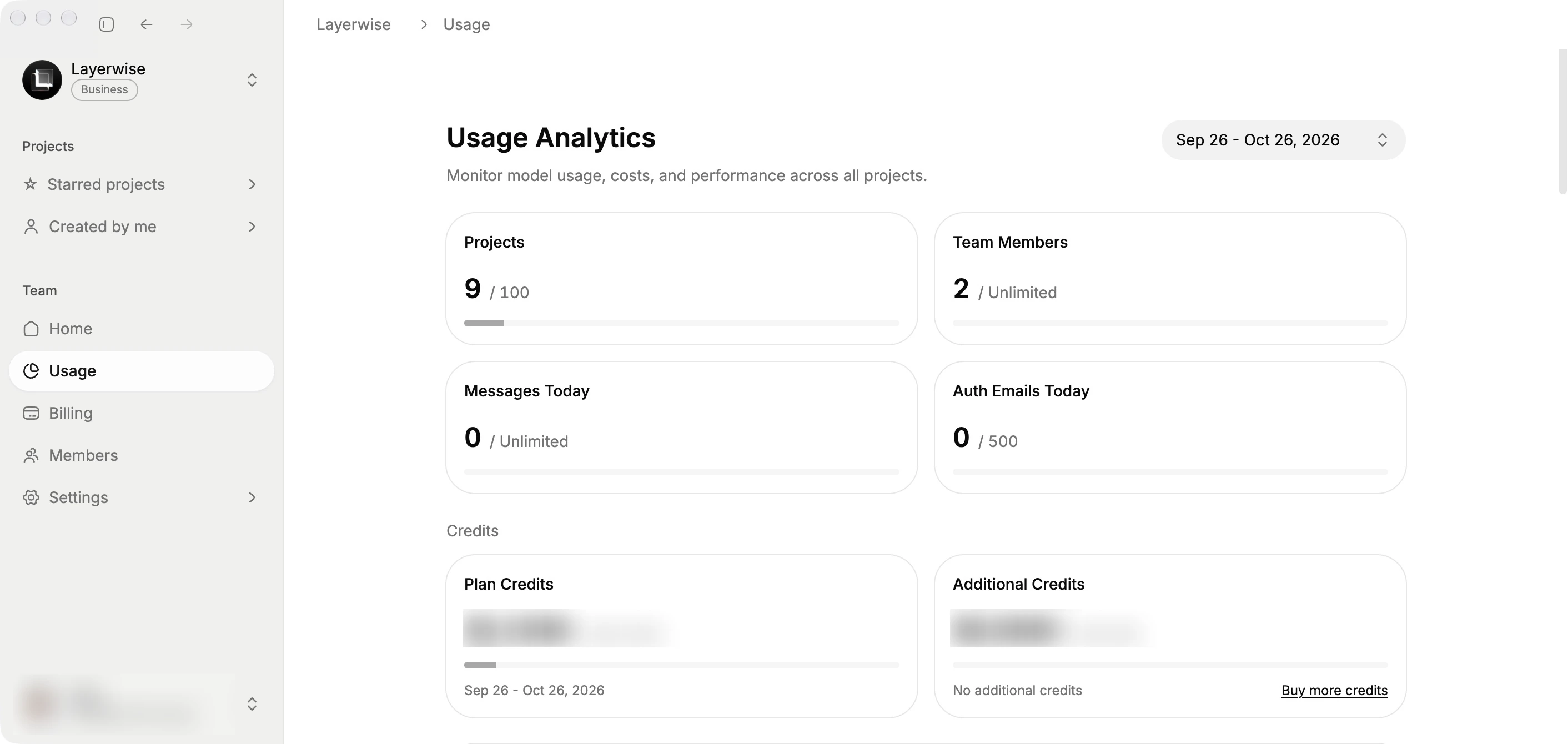
Unused Layerwise credits on paid plans roll over for one month and require a paid subscription to use. Paid teams can purchase additional credits. Bolt lets subscribers to its highest individual monthly Pro plan, or any annual Pro plan, reload tokens.
A Bolt token allowance and a dollar of Layerwise credits are not equivalent units of work. Your total cost depends on the model, project size, and iterations needed.
Backend services: Bolt Cloud and Layerwise projects
Bolt Cloud brings hosting, domains, and a database into each project, powered by platforms including Netlify and Supabase. It includes authentication, file storage, server functions, analytics, and payments through Stripe. Bolt Database is built on PostgreSQL, offers unlimited databases, and supports Google sign-in. Pro and Teams plans can use Supabase instead.
That is a broad set of services. If your app needs file uploads, server functions, or Postgres from the first prompt, Bolt Cloud covers them in one place.
Each Layerwise project includes a dedicated SQLite database and email authentication, with sign-in, verification, password reset, and delivery of those emails. Local and Online use separate data, so test accounts and records stay out of production.
Database
Store app data. Browse and edit your tables.
Authentication
Sign-in, verification, and password reset emails.
Publishing
Deploy a release and get a live URL to share.
Custom domains
Give your published app an address of its own.
Analytics
See visits, popular pages, and traffic sources.
Server logs
Inspect backend requests and follow logs live.
Publishing creates an immutable production release. Layerwise provisions the production database and applies schema migrations, and Deployments lets you roll back to an earlier release. Custom domains are available on Layerwise Pro and higher plans, and on Bolt Pro.
Bolt publishes to a free bolt.host address, and paid plans can publish private sites or buy a domain through Bolt. Its hosting plans cover 10 GB of bandwidth and 333,333 requests a month on Free, and 30 GB and 1 million requests on Pro, with optional pay-as-you-go traffic up to a spending cap.
Understand traffic and debug requests
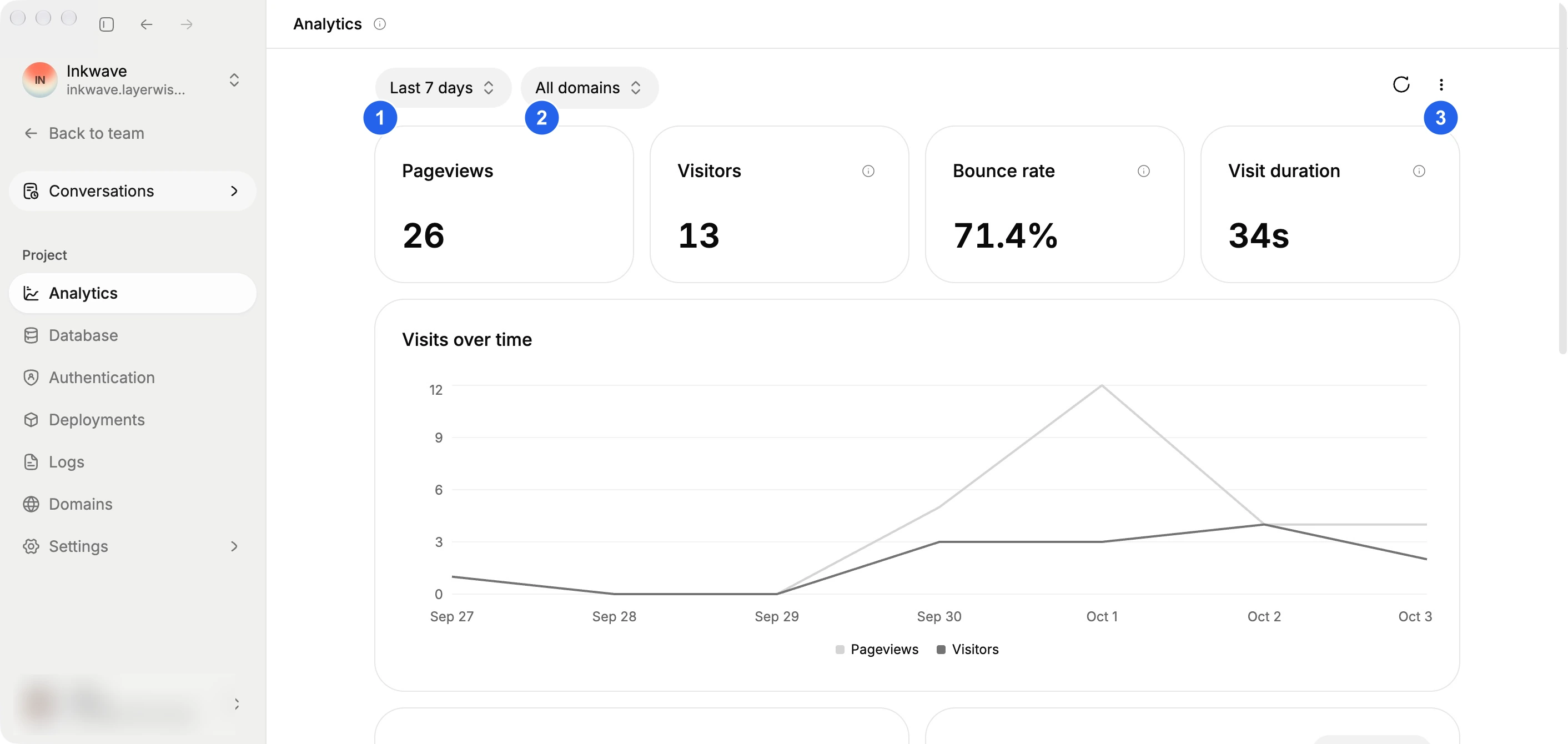
Every Layerwise project includes Analytics, enabled by default on every plan, including Free. You can see pageviews, estimated visitors, bounce rate, and visit duration, and break traffic down by UTM source, medium, and campaign. Export a filtered report as CSV, or receive monthly or weekly email summaries on paid plans. History ranges from 7 days on Free to 6 months on Pro and 1 year on Business.
Bolt's hosting analytics are available on paid plans and show unique visitors, pageviews, top pages, bandwidth, traffic sources, locations, and top 404 pages. Its documentation says you can view up to the last 30 days, and that reported numbers currently include crawler and bot traffic.
For debugging, Layerwise server logs switch between Local preview logs and Online published-app logs in the same table. Messages are grouped by request, and Live shows incoming requests automatically while you reproduce a problem. Export the loaded logs as CSV or JSON when you need a record.
Bolt provides database logs by type, including server functions, authentication, PostgreSQL queries, storage, and cron jobs. Both give you a place to start. Layerwise's logs focus on a live, request-grouped view of local and published backend traffic.
Layerwise vs Bolt pricing
Layerwise has a lower starting monthly price for Pro. Compare the included resources alongside those prices:
| Monthly plan | Layerwise | Bolt |
|---|---|---|
| Free | $0; $5 monthly AI credits; 1 public project; daily message limits | $0; 1M tokens per month with a 300K daily limit |
| Pro | $15; $15 included monthly AI credits | Starts at $25; starts at 10M tokens per month |
| Team plan | Business: $30; $30 included monthly AI credits; unlimited members | Teams: $30 per member; each member gets their own tokens |
Prices above are the monthly starting prices checked on October 11, 2026. See the current Layerwise plans and Bolt pricing for included resources, annual billing, and additional usage.
To estimate your own costs, build a representative feature in each product, verify it works, and review the usage it consumed.
Coming soon: use your own Codex or Claude Code
We are developing support for using Codex or Claude Code already installed on your device, with your own account allowance. The goal is to let you continue AI development in the Layerwise workspace when your Layerwise building credits run out. Your chosen agent's limits would still apply.
This integration is in development. Choosing a Claude or GPT model in Layerwise today uses Layerwise's model access and credits.
Bolt's FAQ says it does not currently have a public API, CLI, or SDK. You can connect MCP servers to give Bolt context from tools such as Notion, Linear, and GitHub. For the current local coding workflow, read Layerwise vs Claude Code.
Which should you choose?
Choose Bolt if you want to start in a browser without installing anything, or you need an iOS or Android app. Bolt's Expo integration supports publishing to the Apple App Store and Google Play. Bolt also fits apps that need Postgres, file storage, or Google sign-in from the start, and teams that work together in its real-time multiplayer mode.
Choose Layerwise if you want to pick the model for each conversation and see its token prices. It also suits builders who want the project on their own computer, with their own editor and terminal, plus built-in UTM analytics and live request logs.
If you are evaluating a Bolt alternative for a portal, dashboard, or small SaaS app, start with the Layerwise quick start. Build a saved-data workflow, test sign-in, and publish it. That gives you a concrete basis for choosing your app builder.
Frequently asked questions
Is Layerwise a Bolt alternative?
Yes. Layerwise builds full-stack web apps through AI conversations, with a local preview and connected project services. Its main differences are user-selected models, token-cost visibility, and a local development workspace.
Can I choose which AI model Bolt uses?
You choose between Bolt's Standard and Max agents, and Bolt selects the models behind them. Its Bolt Forge research preview has let eligible plans pick specific open-source models. Layerwise lets you choose supported models across providers for each conversation.
Does Layerwise run in the browser like Bolt?
No. Layerwise is a desktop app that keeps your project files on your computer and runs the preview locally. Bolt runs entirely in the browser, so there is nothing to install.
Can Layerwise build mobile apps?
Layerwise builds full-stack web apps, and you can test them at phone widths in the preview. For native iOS and Android apps, Bolt's Expo integration is the more direct path.
Is Layerwise cheaper than Bolt?
Its starting monthly Pro subscription is lower as of October 11, 2026: $15 compared with $25. The cost of completing your app depends on the model, project size, and usage. Compare a real task and its resulting costs.
Can I take my code with me?
Yes. Layerwise keeps source files on your computer and supports GitHub and ZIP export. Bolt also supports ZIP download and GitHub sync. Moving app services to another provider may require additional work.
For another app builder comparison, read Layerwise vs Lovable. To try the complete development and publishing workflow, follow Build a Full-Stack Web App with AI.
YOUR NEXT PROJECT
Give your idea a live URL.
Choose your model, build in a live preview, and publish with your project’s backend connected.
Download LayerwiseBuild your first app