

Publish a project
Deploy the current local workspace as a production release.
Publishing creates a production release from the current local workspace. Test the relevant path in the local preview before publishing.
Publish
- Open the project in Preview mode.
- Select Publish in the preview header.
- Confirm that the preview is up to date, then select Publish from the menu.
- Wait for the operation to finish.
After the first successful release, the menu shows the live URL. Up to date means the local source revision matches the last published revision.
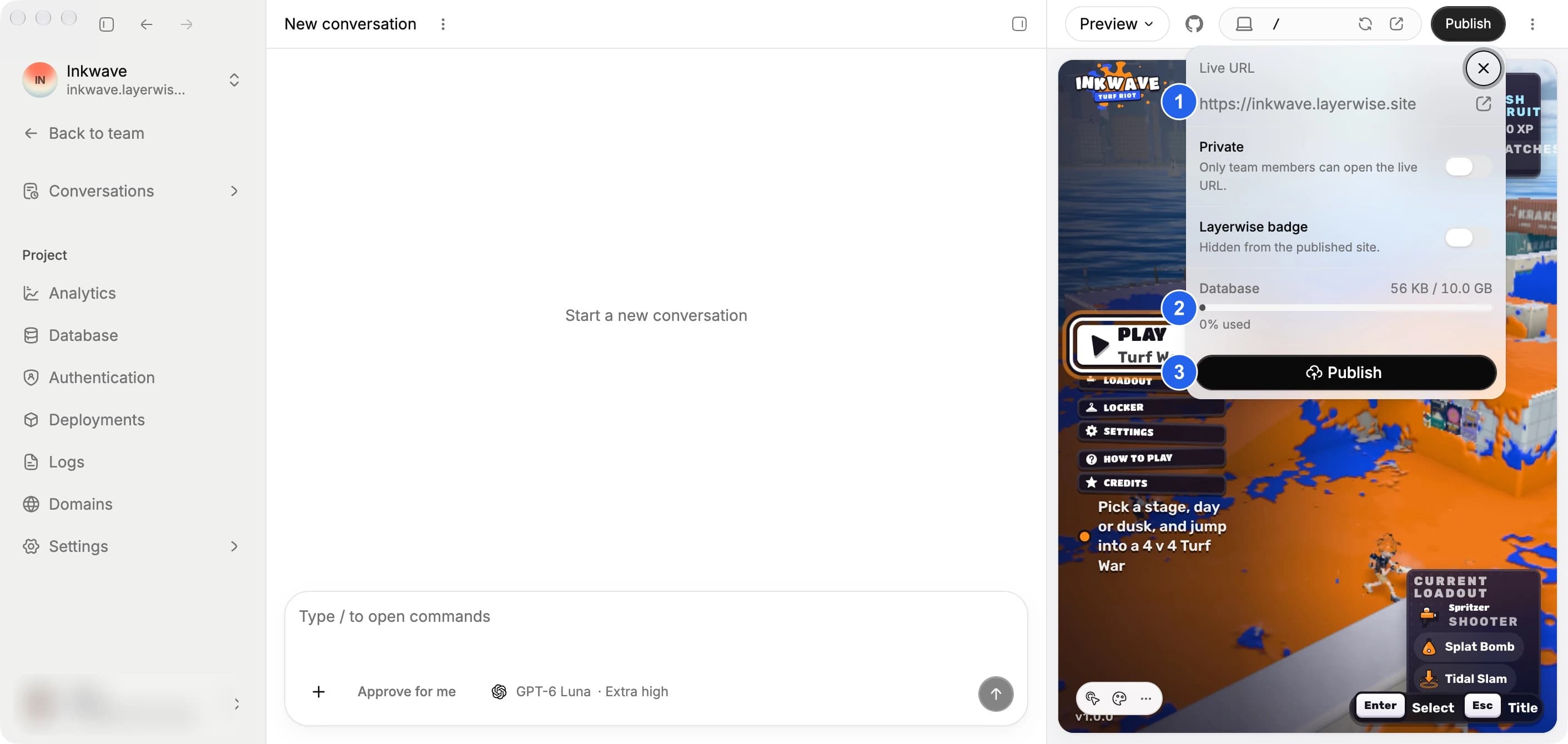
The menu shows (1) the live URL, (2) database storage usage, and (3) the Publish button.
Check deployment status
Open Settings in the project sidebar to see the production domain, active release, last known healthy release, and current deployment status.
Open Deployments for the complete release list and deployment timeline.
Before you publish
Keep the local workspace available until publishing completes. Publishing is unavailable while another publish is running or if the local workspace has not finished preparing.
View website traffic
After publishing, open Analytics in the project sidebar to see visits to your live website. Collection is enabled by default. See Analytics for metrics, filters, CSV exports, and history limits.