Best Trello Alternatives in 2026
Compare the best Trello alternatives in 2026, including Layerwise, Asana, Notion, ClickUp, monday.com, and PLANKA, on pricing, views, and limits.
Table of contents
The right Trello alternative depends on what your team has outgrown: the free plan's limits, a bill that grows with every member, the views you plan in, or a board someone else hosts. This guide compares six options against Trello, starting with Layerwise, which we make.
Trello made kanban boards easy to pick up: lists of cards you drag from left to right, with assignees, due dates, and checklists. According to its pricing page, Power-Ups connect boards to more than 200 apps and tools such as Slack, Google Drive, and Salesforce, built-in automation works on every board, and Trello has iOS, Android, and desktop apps. For many teams, that is all they need. Others reach a plan limit, need a view that sits on a higher tier, or want to stop paying for each person they invite.
Published by Layerwise. Layerwise is our product, so it appears first. Prices and features were checked against official sources on October 20, 2026. Availability varies by plan and region.
Why people look for Trello alternatives
- The Free plan caps each Workspace at 10 collaborators. Members, guests, and pending invitations all count. When a free Workspace goes over the limit, its boards become view-only until the owner upgrades or gets back to 10, according to Atlassian's announcement.
- Free Workspaces have other caps. Free includes up to 10 boards per Workspace, files up to 10MB each, and 250 Workspace command runs per month for automation.
- Paid plans are priced per user. Every Workspace member is billable, and guests on more than one board are billed at the member rate. Standard is $5/user/month billed annually, or $6 billed monthly.
- Views beyond the board start on Premium. Calendar, Timeline, Table, Dashboard, and Map views require Premium, at $10/user/month billed annually or $12.50 billed monthly.
- Trello is cloud-only. Its FAQ says there is no on-premises version. Any board member can export a board as JSON, but CSV export is limited to Premium Workspaces.
None of these is a problem for every team. If one matters to you, the options below make different choices.
Trello alternatives at a glance
| Tool | Best for | What stands out | Free plan | Starting paid plan |
|---|---|---|---|---|
| Layerwise (Cardy template) | Teams that want to own their board app | Source code and data you control; List, Calendar, and Insights views | 1 public project, $5 in monthly AI credits | Pro: $15/month per team, up to 10 members |
| Asana | Project plans with deadlines | Board, list, and calendar free; timeline, Gantt, and dashboards on paid | Personal: 2 users | Starter: $10.99/user/month, billed annually |
| Notion | Task boards next to docs and wikis | One database shown as a board, table, calendar, or timeline | Limited blocks for 2+ members, 10 guests | Plus: $10/seat/month, billed yearly |
| ClickUp | Many work tools in one app | Unlimited free members; detailed Trello importer | Unlimited members, 60MB storage | Unlimited: $7/user/month, billed yearly |
| monday.com | Custom boards and workflows across teams | Configurable columns with Kanban, calendar, and Gantt views | Up to 2 seats and 3 boards | Basic: $9/seat/month, billed annually, 3-seat minimum |
| PLANKA | Self-hosting a Trello-style board | Real-time boards on your own server | Community edition, self-hosted | Pro Self-Hosted: €7.20/user/month, yearly, excl. VAT |
| Trello (reference) | Simple boards with many integrations | Power-Ups, built-in automation, mobile apps | 10 collaborators and 10 boards per Workspace | Standard: $5/user/month, billed annually |
Prices are monthly starting prices, checked on October 20, 2026. Where a vendor lists a higher price for monthly billing, that tool's section includes it. Layerwise is priced per team; the other paid plans are priced per user or seat, so their cost grows with each person you add.
1. Layerwise: build your own kanban board from the Cardy template
Who it's for: Teams whose way of working doesn't fit an off-the-shelf board, who want to own the app and its data, or who want to avoid per-seat pricing. You start from a working board app and change it by describing what you want.
What it does well: The Cardy template is a team kanban board with workspaces, ordered lists, and cards you drag between lists or move from a menu on touch screens and keyboards. Cards have a description, priority, labels, assignees, due date, checklist, comments, and activity history. Each board also has a sortable List view, a Calendar where dragging a card onto a day sets its due date, and Insights with overdue counts, checklist progress, and open work per member. In Trello, calendar, table, and dashboard views start on Premium.
Search, filters, and My tasks help people find work. Owners invite members with links that expire after seven days, the server enforces each member's permissions, and an owner can make a board public and read-only. Archived boards and cards can be restored later. Choose Try the demo in the live demo to open a sample board without an account, and follow the step-by-step tutorial to customize and publish it.
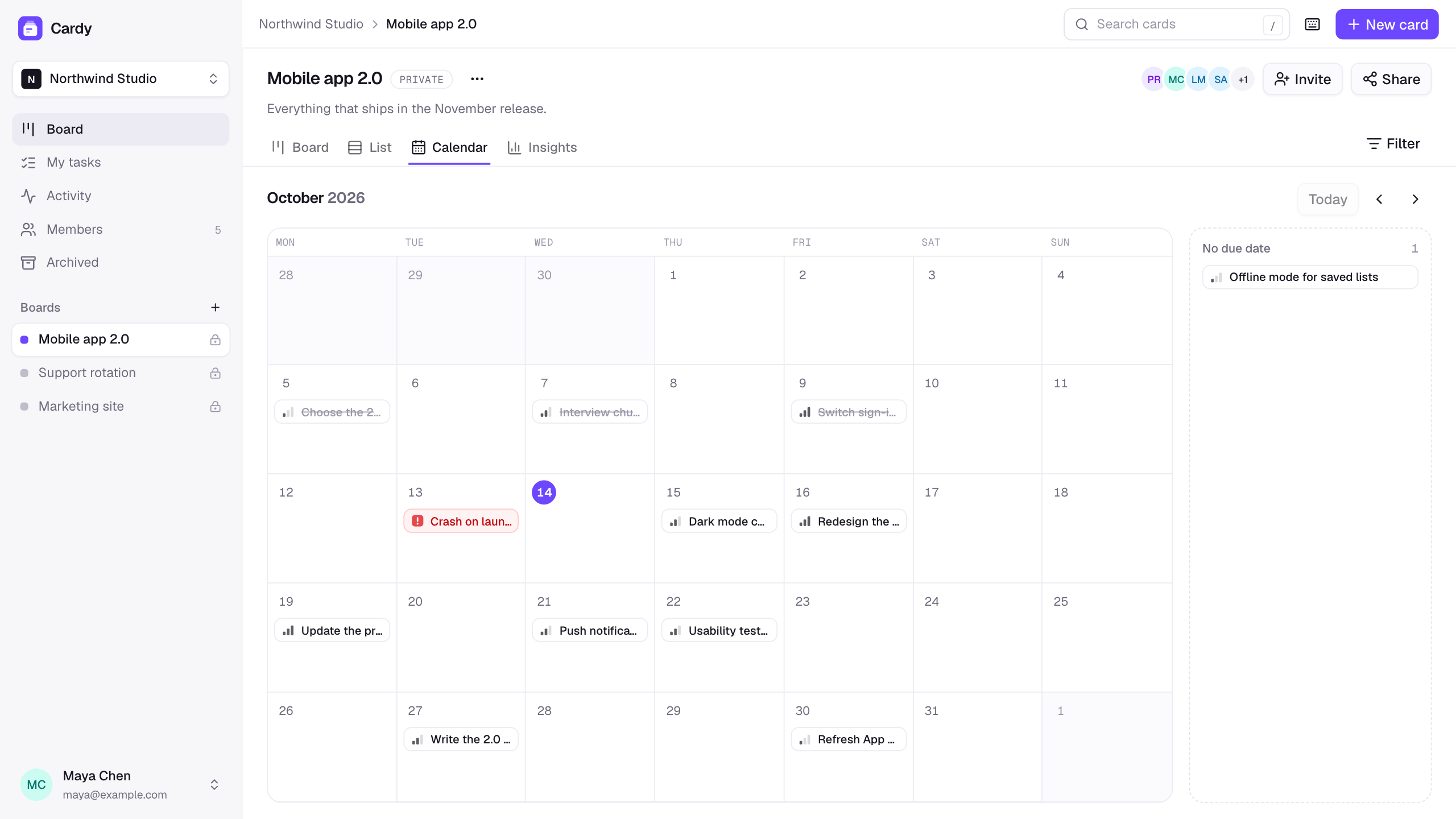
On the template page, Use this template opens Layerwise so you can copy Cardy into a project on your team. Then describe the changes you want, such as new lists or fields. The assistant edits real project files on your computer, and a local live preview shows each change. You can open those files in another editor, export them, or connect GitHub, and Cardy's source code is public.
Each project includes a dedicated production database, Storage for files, email-based authentication, publishing, analytics, and server logs. On paid plans, a private project opens only for members of your Layerwise team, so the board stays internal. Plans are priced per team, and inviting a teammate adds no seat fee.
Trade-offs vs Trello: You maintain the app. Each change uses AI credits, or your own Codex usage if you connect My Codex. Cardy has no Trello import, attachments, email notifications, reminders, integrations, or automation rules. Other members' changes appear when the board reloads, without real-time updates. The owner copies and shares invitation links, and the app sends no invitation emails.
Sign-in is email-based. Cardy is a web app built to work at phone width, with no native iOS or Android apps. The Layerwise desktop app must stay open while you build and publish.
Starting price: Free is $0 with one public project, $5 in monthly AI credits, up to 10 messages per day, and a Layerwise badge. Anyone can open a public project's URL and sign up, and Cardy still keeps new boards private to workspace members. Pro is $15/month with private projects, custom domains, $15 in monthly AI credits, and up to 10 team members. Business is $30/month with unlimited team members, so the price stays the same whether 5 or 40 people use the board. See Layerwise plans.
2. Asana: project plans with timelines
Who it's for: Teams that plan projects with deadlines and dependencies and want a board as one view among several.
What it does well: Asana's free Personal plan includes list, board, and calendar views, unlimited tasks and projects, files up to 100MB each, and more than 100 free integrations, according to Asana pricing. Starter removes the seat limit and adds timeline and Gantt views, reporting dashboards, unlimited automations, and forms.
Asana's CSV importer brings data from Trello and other tools into a project as tasks, with assignees, due dates, dependencies, and custom fields.
Trade-offs vs Trello: Personal is designed for one or two people and includes 2 users, compared with Trello's 10 collaborators per free Workspace. Asana's own importer works from a CSV file, and Trello offers CSV export only in Premium Workspaces.
Starting price: Personal is free. Starter is $10.99/user/month billed annually, or $13.49 billed monthly.
3. Notion: boards next to your docs
Who it's for: Teams that want task boards in the same workspace as their docs, wikis, and meeting notes.
What it does well: A Notion database can be shown as a table, board, timeline, calendar, list, or gallery, according to Notion's guide to database views. A board view groups pages by a property such as status, assignee, or priority, and you drag cards between columns.
Notion's importer connects to your Trello account and brings in boards, lists, and cards. Each board becomes a database, and its lists become groups.
Trade-offs vs Trello: Power-Ups, automations, and permissions don't carry over in the import, and you can import up to 10 boards at a time. On the Free plan, workspaces with two or more members get a limited number of blocks, uploads are capped at 5MB per file, and automations are limited to buttons. Custom database automations start on Plus, according to Notion pricing.
Starting price: Free is $0. Plus is $10/seat/month billed yearly, or $12 billed monthly. Business, which adds Notion Agent and AI Meeting Notes, is $20/seat/month billed yearly, or $24 monthly.
4. ClickUp: many views in one workspace
Who it's for: Teams that want boards, docs, sprints, and time tracking in one app.
What it does well: ClickUp's Free Forever plan includes unlimited members, unlimited tasks, Kanban boards, a calendar view, collaborative docs, and sprint management, according to ClickUp pricing.
Its Trello importer brings over assignees, attachments up to 1GB, comments, descriptions, checklists, due dates, tags, priority, and custom fields. You choose whether each Trello column becomes a status or a list.
Trade-offs vs Trello: Free Forever includes 60MB of storage, and Gantt charts and the Timeline view are trial-only. The import guide notes that attachments can push a Free workspace past its storage limit. It also asks you to create Spaces before importing, so plan your structure first.
Starting price: Unlimited is $7/user/month billed yearly, or $10 billed monthly. On October 20, 2026, the same pricing page also showed a newer lineup with a Core plan at $9/user/month billed yearly, so confirm the current plans when you sign up.
5. monday.com: configurable boards and workflows
Who it's for: Teams that want to design their own boards, columns, and workflows, with at least three paid seats.
What it does well: monday.com's Kanban view turns a board's Status column into card columns. Basic includes unlimited items and unlimited free viewers with read-only access. Standard adds Timeline and Gantt views, a Calendar view, and 250 automation actions and 250 integration actions per month, according to monday.com pricing. It also has iOS and Android apps.
Trade-offs vs Trello: The Free plan includes up to 2 seats and 3 boards, and paid plans start from 3 users. The Trello importer supports card names, labels, and dates. Descriptions, checklists, activity, and files are not supported.
Starting price: Basic is $9/seat/month billed annually, or $12 billed monthly, with a 3-seat minimum. Calendar and timeline views start on Standard at $12/seat/month billed annually, or $14 billed monthly.
6. PLANKA: a self-hosted Trello-style board
Who it's for: Teams with someone who can run a server and who want a Trello-style board on infrastructure they control.
What it does well: PLANKA has projects, boards, lists, and cards with drag and drop and real-time updates. The free Community edition includes attachments, comments, custom fields, due dates, webhooks, and a REST API, and it runs with your own database and backups.
The docs describe a Trello import that reads a board's JSON export.
Trade-offs vs Trello: PLANKA is source-available under a fair-code license. Its license guide says the license does not meet the Open Source Initiative's definition: internal business use is allowed, and running it as a commercial hosted service is not.
You install, update, and back it up yourself. Phone and tablet support, calendar and timeline views, guest roles, and SSO are in the paid Pro edition. The Trello import skips users and attachments and brings in one checklist per card.
Starting price: Community is free to self-host. Pro Self-Hosted is €7.20/user/month billed yearly, or €7.90 billed monthly, excluding VAT, according to PLANKA pricing. Hosted Pro starts at €8.50/user/month billed yearly, or €9.40 billed monthly, with a 5-user minimum.
How to choose a Trello alternative
- You want a board you own, priced per team: Layerwise with Cardy gives you the source code and the data, and Business covers unlimited members for $30/month.
- You need timelines and Gantt charts: Asana Starter, ClickUp Unlimited, and monday.com Standard include Gantt views, and Asana Starter adds reporting dashboards.
- Your tasks belong next to docs and wikis: Notion keeps boards and pages in one workspace.
- You want a free plan for more than 10 people: ClickUp Free Forever allows unlimited members. Asana Personal and monday.com Free allow two users or seats.
- You want checklists and attachments to come with your boards: ClickUp's importer lists both. monday.com does not import checklists or files, and PLANKA skips attachments.
- You must run the board on your own servers: PLANKA is designed for self-hosting.
- You want to keep using Trello: If your team fits within 10 collaborators, relies on Power-Ups, or wants native mobile apps, Trello may still be the right fit. Standard adds unlimited boards for $5/user/month billed annually.
Frequently asked questions
What is the best free Trello alternative?
For a team larger than 10, ClickUp Free Forever allows unlimited members, with 60MB of storage. Asana Personal and monday.com Free are limited to 2 users or seats. PLANKA's Community edition is free if you host it yourself. Layerwise Free includes one public project, so you can try Cardy before choosing a paid plan.
Is there a Trello alternative without per-user pricing?
Layerwise plans are priced per team. Pro is $15/month for up to 10 team members, and Business is $30/month with unlimited members, so adding a teammate adds no seat fee. For comparison, 10 people on Trello Standard cost $50/month billed annually, and 10 on Premium cost $100/month. PLANKA's Community edition has no license fee, but you run and maintain the server.
Can I build my own Trello alternative?
Yes. In Layerwise, start from the Cardy template, which already has boards, lists, cards, due dates, checklists, invitation links, and List, Calendar, and Insights views, then describe the changes you want. The kanban board tutorial covers card order, permissions, and testing. The project files stay on your computer, and you can connect them to GitHub.
How do I move my boards out of Trello?
Any Trello board member can export a board as JSON, and Premium Workspaces can also export CSV. ClickUp, Notion, and monday.com connect to your Trello account and import boards directly, each with different field coverage. Asana imports a CSV file, and PLANKA imports a board's JSON export. Cardy has no Trello importer, so you would describe one to the Layerwise assistant and test it on a copy of a board first.
How many people can use Trello for free?
A free Trello Workspace allows up to 10 collaborators, counting members, guests, and pending invitations. If a free Workspace has more than 10, its boards become view-only until the owner upgrades to a paid plan or gets back to 10. Paid plans bill for each Workspace member.
YOUR NEXT PROJECT
Give your idea a live URL.
Choose your model, build in a live preview, and publish with your project’s backend connected.
Download LayerwiseBuild your first app