Best Calendly Alternatives in 2026
Compare Calendly alternatives in 2026, including Layerwise, Cal.com, Google Calendar, Microsoft Bookings, SavvyCal, and TidyCal, on price and limits.
Table of contents
Pick a Calendly alternative by who takes the bookings, which calendar you already live in, and whether you need payments, reminders, or booking rules of your own. This guide compares six options against Calendly, starting with Layerwise, which we make.
Calendly is a mature scheduling tool. Its free plan includes unlimited one-on-one meetings, Zoom, Google Meet, and Microsoft Teams conferencing, and a mobile app, and paid plans add reminders, payments, routing, and a long list of integrations, according to Calendly pricing. People usually start comparing when the free plan feels narrow or when per-seat pricing grows with the team.
Published by Layerwise. Layerwise is our product, so it appears first. Prices and features were checked against official sources on October 20, 2026. Availability varies by plan and region.
Why people look for Calendly alternatives
These limits come from Calendly's pricing page:
- The free plan covers one event type and one calendar connection. Offering a second kind of meeting, such as a 15-minute intro next to a 60-minute session, needs a paid plan.
- Common features start on Standard. Automated meeting reminders, payments through Stripe and PayPal, removing Calendly branding, HubSpot, Mailchimp, and Zapier automations, and custom webhooks are not included on Free.
- Paid plans are priced per seat. Standard is $12/seat/month billed monthly, or $10 billed yearly. Calendly says a seat is required for each user who connects a calendar and hosts meetings; invitees don't need one.
- Team scheduling costs more. Round-robin distribution starts on Teams, at $20/seat/month billed monthly or $16 billed yearly.
None of these is a problem for every team. If one matters to you, the options below make different choices.
Calendly alternatives at a glance
| Tool | Best for | What stands out | Free plan | Starting paid plan |
|---|---|---|---|---|
| Layerwise (Slotly template) | One host who wants to own and change the app | Event types, buffers, time zones, and double-booking protection in your code | 1 public project, $5 in monthly AI credits | Pro: $15/month per team |
| Cal.com | Calendly-style features on a free plan | Unlimited event types and calendars, payments, and Calendly import on Free | 1 user | Teams: $12/user/month, billed yearly |
| Google Calendar appointment schedules | A booking page inside Google Calendar | Bookings land on your calendar, with Google Meet built in | A single booking page | Workspace Business Standard: $14/user/month, billed annually |
| Microsoft Bookings | Organizations on Microsoft 365 | Outlook availability, Teams meetings, and shared team booking pages | None | Microsoft 365 Business Basic: $7.00/user/month, paid yearly |
| SavvyCal | People who send many scheduling links | Invitees can overlay their own calendar on your link | Account setup and meeting polls only | Basic: $10/user/month, billed annually |
| TidyCal | Solo providers who sell sessions | Paid bookings on Free, plus one-time lifetime plans | Unlimited booking types, 1 calendar | Individual Lifetime: $29 once; Pro: $12/month |
| Calendly (reference) | Scheduling with a wide set of integrations | Routing, CRM connections, and a Notetaker add-on | 1 event type, 1 calendar connection | Standard: $12/seat/month |
Prices are monthly starting prices with monthly billing unless noted, checked on October 20, 2026. Calendly, Cal.com, SavvyCal, and Microsoft 365 charge per user or seat. Layerwise charges per team, and TidyCal also sells one-time lifetime plans.
1. Layerwise: build your own scheduling app from the Slotly template
Who it's for: A coach, consultant, tutor, or anyone holding office hours who wants booking rules shaped around their business, the app and its data in their own project, and a price that doesn't grow with each host. Every host signs up in the app and manages only their own event types and bookings.
What it does well: Slotly is a complete scheduling app you copy into a Layerwise project and change by describing what you want. It includes event types with a duration, location, minimum notice, booking window, start time interval, and optional daily limit, plus weekly hours in the host's time zone with date overrides and buffers before and after meetings.
Guests book without an account and see times in their own time zone. The server saves each booking in a single statement, so two guests who pick the same time can't both get it. Guests get a private link to add the booking to their calendar, reschedule, or cancel with a reason. Hosts see today's agenda and search bookings in list or calendar views.
Try the live demo, or follow How to Build a Scheduling App with AI to test it with two time zones and two guests. The source is on GitHub.
Layerwise is a desktop app for macOS, Windows, and Linux. The assistant edits project files on your computer, a local preview shows each change, and Publish puts the app on a *.layerwise.site address or, on Pro and higher, your own domain. Every project includes a production database, email authentication, transactional email, analytics, and server logs, and you can connect GitHub or export the files.
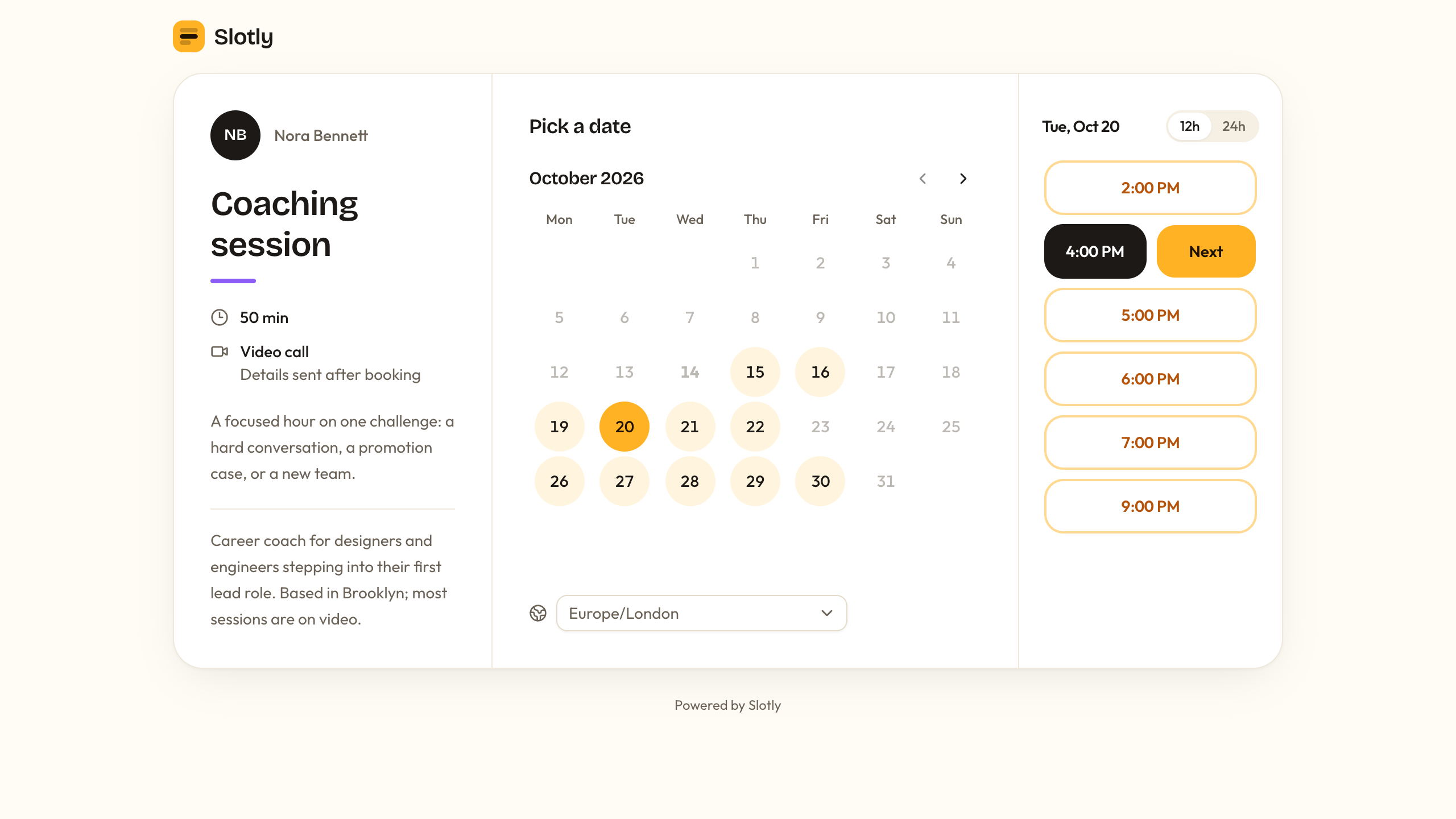
Trade-offs vs Calendly: Slotly sends no booking emails or reminders, and it doesn't sync with Google Calendar, Outlook, or any other calendar. It only knows about bookings made in Slotly, so you block other commitments with date overrides. It has no payments, no team scheduling such as round robin, no automatic video links (you paste a meeting link into the event type), and no Calendly import.
You can ask the assistant to add booking emails, which Layerwise Email sends from an address on mail.layerwise.site: up to 20 app emails a day on Free and 200 per project on Pro. Each change uses AI credits, or your ChatGPT plan through My Codex, and you test and maintain the app yourself. Host sign-in is email-based, there are no native mobile apps, and the desktop app must stay open while you build and publish.
Starting price: Free is $0 and includes one public project, which suits a booking app because guests can book without an account. It comes with $5 in monthly AI credits, up to 10 messages a day, a 100 MB database, and a Layerwise badge. Pro is $15/month ($150/year) with $15 in monthly AI credits, custom domains, and no badge. New projects on paid plans start private, so turn off Private before you share booking links; see Keep a project private. Plans are priced per team, so inviting a teammate adds no seat fee. Running out of AI credits doesn't pause a published app, though a database that reaches its storage limit can. See Layerwise plans.
2. Cal.com: Calendly-style scheduling with a generous free plan
Who it's for: Individuals who want more than Calendly's free plan offers, and small teams that want round robin at a lower per-user price.
What it does well: The free Individuals plan on Cal.com's pricing page includes unlimited event types and calendars, email and SMS notifications, more than 100 app integrations, Stripe and PayPal payments, two-way Salesforce and HubSpot sync, a mobile app, and 1-click import of Calendly events. Teams adds round-robin scheduling, managed and collective event types, routing forms, and removal of Cal.com branding.
Trade-offs vs Calendly: The free plan covers one user, and team features need Teams or higher. Cal.com is also no longer fully open source. In 2026 it moved its production code to a private repository, and the public code became Cal.diy, an MIT-licensed community edition you host yourself. Cal.diy removes teams, routing forms, workflows, and other commercial features, and its README recommends it for personal, non-production use.
Starting price: Free for one user. Teams is $12 per user/month billed yearly, compared with $16 for Calendly Teams billed yearly, and comes with a 14-day free trial. Organizations is $28 per user/month billed yearly.
3. Google Calendar appointment schedules: booking built into your calendar
Who it's for: People who already run their day in Google Calendar and need one simple booking page.
What it does well: Appointment schedules let people book time with you from a page you share or embed. Each booking is added to your calendar, and the page blocks times when you're busy. When you create a schedule, you set the length, weekly hours, and booking form, and choose Google Meet, in person, or a phone call.
Trade-offs vs Calendly: A personal Google Account or Workspace Business Starter gets a single booking page. Google's premium feature comparison shows that more than one schedule, automatic email reminders, and availability checks across multiple calendars need an eligible Google One or Workspace subscription. Accepting payments through Stripe and verifying guest emails need Workspace Individual, Business Standard or Plus, Enterprise, Education, or Nonprofits. You also can't create a schedule in the Calendar app for Android or iPhone.
Starting price: Free with a personal Google Account for a single booking page. Premium features, including payments, come with eligible plans such as Google Workspace Business Standard at $14/user/month billed annually, or $16.80 billed monthly. Google AI Pro, at $19.99/month, also unlocks the premium scheduling features except payments.
4. Microsoft Bookings: scheduling for Microsoft 365 organizations
Who it's for: Organizations already on Microsoft 365 that book clients or colleagues through Outlook and Teams.
What it does well: Microsoft Bookings includes a web booking page connected to Outlook, email and SMS notifications, and Teams online meetings with a unique link for each appointment. Personal Bookings shares your own availability, and Shared Bookings lets a team set up services, staff, and business hours. It also runs as an app inside Teams and Outlook.
Trade-offs vs Calendly: Bookings has no standalone free plan; it comes with the Microsoft 365 and Office 365 subscriptions Microsoft lists. The service description notes that online meetings require the booked staff member to have a Teams or Skype for Business license that can create meetings. SMS notifications work only in North America and the United Kingdom and need an additional Teams Premium license.
Starting price: Microsoft 365 Business Basic, which lists Bookings among its apps, is $7.00/user/month paid yearly, according to Microsoft 365 plans and pricing.
5. SavvyCal: scheduling links built around the person booking
Who it's for: People who send many scheduling links and care how booking feels for the other person.
What it does well: On SavvyCal, recipients can lay their own calendar on top of your link to spot a time that works for both of you. It creates Zoom, Google Meet, or Teams links automatically. The Basic plan on the pricing page includes unlimited scheduling links, polls, and calendars from Google, Microsoft, iCloud, and Fastmail, round robin and collective team modes, reminders and workflows, CRM and Zapier integrations, and an API with webhooks.
Trade-offs vs Calendly: There is no free scheduling plan. You can set up an account and use meeting polls for free, but activating scheduling links for others requires a paid plan. Pricing is per user, and custom domains, removing SavvyCal branding, emails from your own address, and paid bookings through Stripe require Premium.
Starting price: Basic is $10 per user/month billed annually, and Premium is $17. SavvyCal offers a 30-day money-back guarantee.
6. TidyCal: paid bookings and a one-time price
Who it's for: Coaches, tutors, and other solo providers who charge for sessions and want to pay once.
What it does well: TidyCal's free plan includes unlimited bookings and booking types, paid bookings through Stripe and PayPal, recurring and package bookings, and a booking page of your own, with one Google, Office 365, or Apple calendar. Individual Lifetime adds automatic Zoom, Google Meet, or Teams links, group bookings, custom reminder and confirmation emails, booking limits, and 10 calendar connections. Agency Lifetime adds round robin and collective meetings.
Trade-offs vs Calendly: Free and lifetime plans charge a 1% platform fee on payments processed through Stripe, on top of Stripe's own fees, and show TidyCal branding, reduced on the lifetime plans. The free plan doesn't create meeting links automatically. Custom domains, removing branding, and unlimited calendar connections require Pro, and lifetime plans are sold through AppSumo.
Starting price: Free is $0. Individual Lifetime is a one-time $29, and Agency Lifetime is a one-time $79. Pro is $12/month, or $99/year.
How to choose a Calendly alternative
Start with the reason you are comparing:
- You want a booking app you own and can change: Start from Slotly in Layerwise, and decide whether you need booking emails, calendar sync, or payments before you share the link.
- You want the most on a free plan: Cal.com's free plan includes unlimited event types, unlimited calendars, and payments. TidyCal's free plan includes paid bookings with a 1% platform fee.
- You live in Google Calendar or Outlook: Google Calendar appointment schedules and Microsoft Bookings keep bookings next to the rest of your day.
- You want people to find a time faster: SavvyCal lets invitees overlay their own calendar.
- You want to pay once: TidyCal sells $29 and $79 lifetime plans.
- You want to add hosts without seat fees: Layerwise plans are priced per team, and each host signs up in your Slotly app.
- You want to keep using Calendly: If you rely on its CRM connections, routing, mobile app, and admin controls, Calendly may still be the right fit.
Test your top two choices with a real booking: book from a second browser in another time zone, reschedule, and cancel, then check what each person received.
Frequently asked questions
What is the best free Calendly alternative?
For one person, Cal.com's free plan goes furthest, with unlimited event types and calendars, Stripe and PayPal payments, and a Calendly import. TidyCal's free plan suits paid sessions, with a 1% platform fee on Stripe payments. Google Calendar gives a personal account one booking page. Layerwise Free can publish the Slotly booking app as one public project, though Slotly does not sync calendars or send booking emails.
Is there a Calendly alternative without per-user pricing?
Layerwise plans are priced per team, so inviting a teammate adds no seat fee, and Slotly hosts sign up as users of your app. TidyCal sells one-time lifetime plans for $29 and $79. Calendly, Cal.com Teams, SavvyCal, and Microsoft 365 all charge per user or seat.
Can I build my own Calendly alternative?
Yes. Choose Use this template on the Slotly template page to copy a working booking app into a Layerwise project, describe the changes you want, and publish. Slotly handles event types, weekly hours, time zones, buffers, and double booking. It does not send booking emails, sync external calendars, or take payments.
Can I move my Calendly event types to another tool?
Cal.com's free plan lists 1-click import of Calendly events, and TidyCal includes a Calendly importer on every plan, including Free. Slotly has no Calendly import, so you recreate your event types and weekly hours by hand. Whichever tool you choose, keep your Calendly link active until meetings booked there have passed.
Do guests need an account to book?
Not in Calendly or Slotly. Calendly says invitees don't need a seat or an account. Slotly guests book from a public link, so the project must be public: Free projects are, and on paid plans you turn off Private in the Publish menu.
YOUR NEXT PROJECT
Give your idea a live URL.
Choose your model, build in a live preview, and publish with your project’s backend connected.
Download LayerwiseBuild your first app