Best Feedly Alternatives in 2026
Compare the best Feedly alternatives in 2026, including Layerwise, Inoreader, NewsBlur, Feedbin, Readwise Reader, and FreshRSS, on limits and price.
Table of contents
The right Feedly alternative depends on what you want from your reader: more room on a free plan, rules that sort what comes in, newsletters and highlights in one place, a server you run yourself, or a reader you can change. This guide compares six options against Feedly, starting with Layerwise, which we make.
Feedly is a widely used RSS reader with web and mobile apps, a free plan, and Feedly AI for tracking topics and muting noise. For many readers, it is a dependable default. Others reach a free-plan limit, want a feature on a higher tier, or want more control over their reading data.
Published by Layerwise. Layerwise is our product, so it appears first. Prices and features were checked against official sources on October 20, 2026. Availability varies by plan and region.
Why people look for Feedly alternatives
- The free plan has tight limits. Feedly's pricing page says the free plan follows up to 100 feeds, organized into 3 folders.
- Search, notes, and highlights are paid. Pro, at $6/month billed annually, adds them along with 1,000 feeds and integrations such as Evernote, OneNote, Buffer, and Zapier, and it hides sponsored ads.
- AI features and newsletters start on Pro+. Feedly AI Feeds, mute filters, deduplication, newsletter feeds, and RSS Builder are listed on Pro+, at $12/month billed annually, or $8.25/month for the first year under the offer shown when we checked. The help center lists 100 mute filters and 50 newsletters for Pro+.
- Team features go through sales. Team feeds and boards, Slack and Microsoft Teams, and API access are on Enterprise, which has no public price.
- Exports cover feeds only. Feedly's OPML export runs in the web app and includes your public RSS feeds. Boards, Read Later articles, Feedly AI Feeds, and Reddit feeds are left out.
None of these is a problem for every reader. If one matters to you, the options below make different choices.
Feedly alternatives at a glance
| Tool | Best for | What stands out | Free plan | Starting paid plan |
|---|---|---|---|---|
| Layerwise | A reader you own and can change | Feedflow template: three-pane reader, highlights, notes, OPML | 1 public project | Pro: $15/month per team |
| Inoreader | Power users who automate their feeds | Filters, rules, monitoring feeds, and newsletters on Pro | Up to 150 feeds | Pro: $7.50/month, billed annually |
| NewsBlur | Training what you see, with native apps | Story training, free newsletters, open source | Up to 64 sites | Premium: $36/year |
| Feedbin | One simple paid plan | Newsletters, full-text extraction, actions | None; 30-day trial | $7/month or $70/year |
| Readwise Reader | Highlighting articles, PDFs, and newsletters | Read-later, RSS, and annotation in one app | None; 30-day trial | $9.99/month, billed annually |
| FreshRSS | Self-hosting on your own server | Open source, OPML, mobile apps through its APIs | Free software | None; you run the server |
| Feedly (reference) | AI-assisted topic tracking | Feedly AI Feeds, mute filters, and newsletters on Pro+ | Up to 100 feeds in 3 folders | Pro: $6/month, billed annually |
Prices are monthly starting prices unless noted, checked on October 20, 2026. Feedly, Inoreader, NewsBlur, Feedbin, and Readwise price individual accounts. Layerwise plans are priced per team, and inviting a teammate adds no seat fee.
1. Layerwise: build your own RSS reader from the Feedflow template
Who it's for: People who want to own their reader and decide how it works, such as a personal reader for the sites they follow or a reader built around one topic. Layerwise is an AI app builder that runs as a desktop app, so this suits people comfortable describing changes in chat and maintaining what they publish. A reader like this is a small example of personal software.
What it does well: Feedflow is a keyboard-first RSS reader template with three panes: subscriptions and folders, a story list, and the open story. It includes list, card, and magazine layouts with adjustable type; Starred, Read later, and Recently read views; highlights and notes collected in a Notes view; search; and Google Reader-style keyboard shortcuts. Add a feed by its website or feed address, or pick one from Discover. Search, highlights, and notes, which Feedly reserves for paid plans, are part of the template. The live demo opens a sample library without an account.
Feeds are fetched on the server, so the reader can load feeds that browsers would block, and unchanged feeds need not resend the whole document. OPML import and export move subscriptions and folders, and each account syncs its own library. The step-by-step tutorial covers the data model, fetching, per-account privacy, OPML, and publishing.
On the template page, Use this template opens Layerwise so you can copy Feedflow into a project on your team. Then describe changes in chat; the assistant edits the project files on your computer and shows the result in a local preview. The source is public on GitHub, and you can connect your own repository. Each project includes a database, email authentication, publishing, analytics, and server logs.
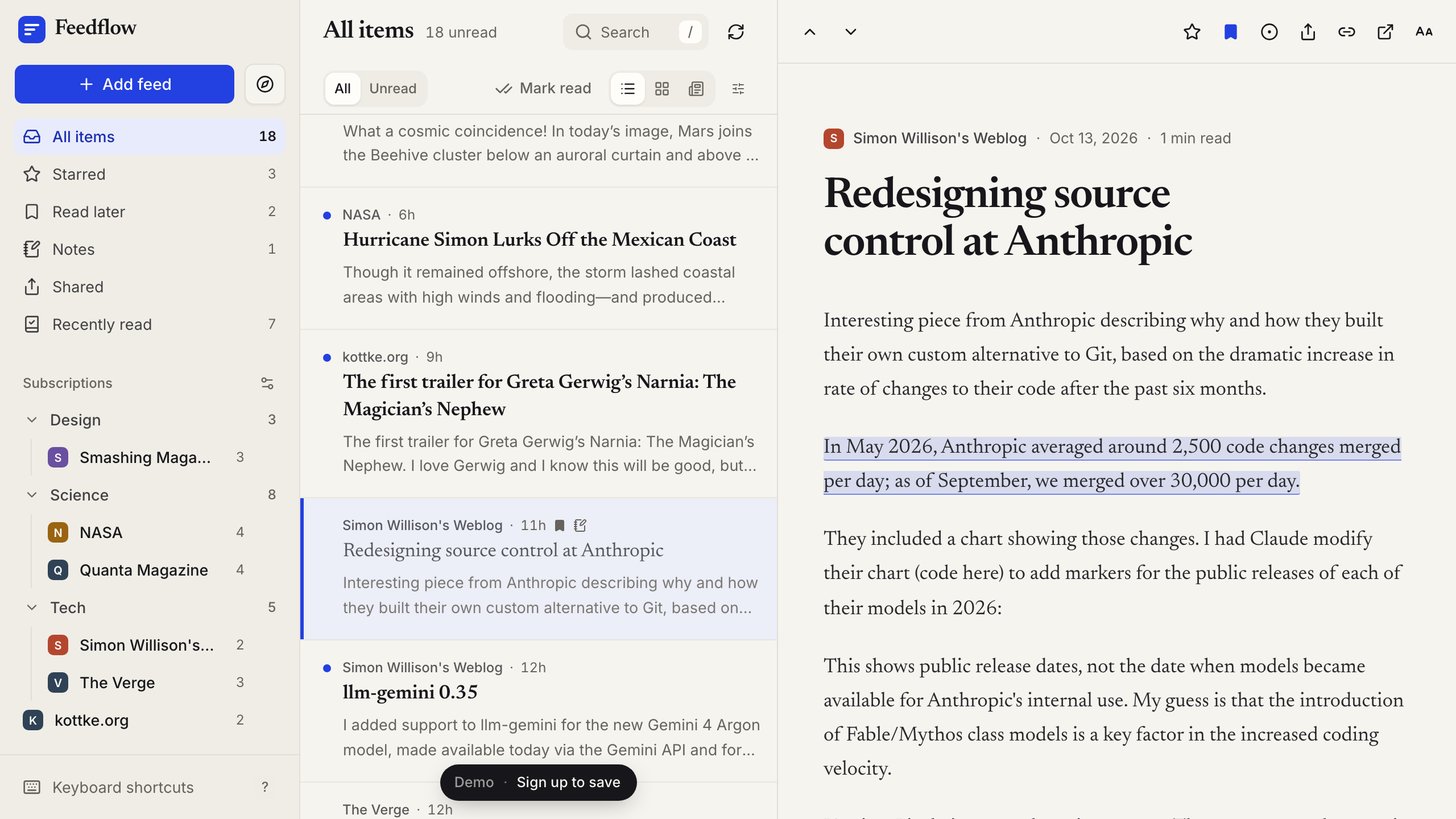
Trade-offs vs Feedly: Feeds refresh only while the reader is open: with the refresh button or the r key, on an auto-refresh timer of 15, 30, or 60 minutes, and when you open the reader. Nothing refreshes in the background while the app is closed; scheduled server-side refresh would be a separate feature to build and verify.
Feedflow has no equivalent of Feedly AI, mute filters or rules, newsletter feeds, a browser extension, or integrations such as Evernote or Zapier. Story text is the plain text a feed provides. A library holds up to 500 feeds and 10,000 stories, and one OPML import accepts up to 50 feeds.
It is a web app with no native mobile apps, and sign-in is email-based, with a password or a one-time email code. You maintain the app, and each change uses AI credits or your own Codex usage. The desktop app must stay open while you build and publish, and the published app has its own database, so you add your feeds again after publishing.
Starting price: A personal reader can run on Free ($0) as one public project: anyone with the URL can sign up, and each account sees only its own library. Free includes $5 in monthly AI credits, up to 10 messages per day, a 100 MB database, and a Layerwise badge. To keep the reader private to your team, use Pro at $15/month ($150/year), which adds custom domains and $15 in monthly AI credits. My Codex lets conversations draw on a ChatGPT plan that includes Codex instead of Layerwise credits. Running out of AI credits does not pause the published reader, though a database at its storage limit can. If all you need is a hosted reader, Feedly Pro and the paid readers below cost less than Layerwise Pro; Layerwise pays off when you want to change how the reader works. See Layerwise plans.
2. Inoreader: rules, filters, and monitoring feeds
Who it's for: Heavy readers and researchers who want to automate what happens to incoming articles.
What it does well: Inoreader's pricing page lists up to 150 feeds on the free plan, with folders, search in your feeds, a read-later list, full-content loading, and Google News alerts. Pro raises the limit to 2,500 feeds and adds filters and rules, monitoring feeds, newsletter feeds, social media feeds, websites without RSS, annotations, and AI article summaries. Inoreader also has iOS and Android apps.
Coming from Feedly, its getting started guide points you to Import feeds in the sidebar.
Trade-offs vs Feedly: Filters, rules, newsletters, and annotations are on Pro, which costs slightly more than Feedly Pro when both are billed annually. Inoreader has many settings and per-feature limits, so expect some setup time. Pro feeds are guaranteed to update at least once an hour.
Starting price: Free is $0 with up to 150 feeds. Pro is $7.50/month billed annually, or $9.99 billed monthly. Pro includes API access, and custom plans are quoted on request.
3. NewsBlur: train what you see, with native apps
Who it's for: Readers who want explicit control over what is highlighted or hidden, and people who prefer open source.
What it does well: On the free plan, NewsBlur follows 64 sites with real-time updates, lets you train stories by author, tag, and title, saves stories for later, and includes iOS and Android apps, according to its pricing page. Email newsletters are free as well.
Premium adds 1,024 sites, search, text view, and River of News reading by folder. Premium Archive adds a permanent searchable archive, web feeds for sites without RSS, Ask AI, and a daily briefing. Its Feedly comparison lists OPML import and export, an MIT open-source license, and a Docker install for self-hosting.
Trade-offs vs Feedly: The free plan follows fewer sites than Feedly Free, and search requires Premium. Ask AI, the daily briefing, and the full archive start on Premium Archive at $99/year, and fetching every feed every 5 to 15 minutes requires Premium Pro.
Starting price: Free is $0. Premium is $36/year, Premium Archive is $99/year, and Premium Pro is $29/month. Every plan starts with a free 30-day premium trial.
4. Feedbin: one plan with newsletters and full text
Who it's for: Readers who want a clean, paid reader with no tiers to compare.
What it does well: Feedbin has one plan with everything included: websites, newsletters through a unique email address, podcasts, YouTube channels, full-text extraction for partial feeds, saved searches, and actions that star, mark as read, or send a push notification. It syncs with iOS, Mac, and Android apps, including Reeder and NetNewsWire, as listed on its homepage.
Its subscribe guide covers OPML import and browser extensions for Safari, Chrome, and Firefox that subscribe to feeds and save pages to read later.
Trade-offs vs Feedly: There is no free plan after the trial. Feedbin stores the 400 most recent articles per feed, so older stories drop off.
Starting price: $7/month or $70/year, after a free 30-day trial that needs no credit card.
5. Readwise Reader: read-it-later, RSS, and highlights together
Who it's for: People who read to take notes and want feeds, saved articles, and documents in one place.
What it does well: Reader handles RSS, read-it-later, newsletters, PDFs, EPUBs, YouTube transcripts, and highlighting on the open web through a browser extension. It adds keyboard-based reading, full-text search, text to speech, and Ghostreader, an AI assistant for questions and definitions. It runs on web, desktop, iOS, and Android, and Readwise exports your highlights to tools such as Notion and Obsidian.
To move from Feedly, upload your OPML file by dragging it onto the web app.
Trade-offs vs Feedly: Reader checks for new RSS content about every 5 minutes, but its docs note that feeds with fewer subscribers may refresh only when you open the app. There is no free plan after the trial.
Starting price: Readwise is free for 30 days. The full Readwise plan, which includes Reader, is $9.99/month billed annually or $12.99 billed monthly, according to Readwise pricing.
6. FreshRSS: open source on your own server
Who it's for: People who want to self-host their reader and keep the data on a server they control.
What it does well: FreshRSS is a free, self-hostable feed aggregator under the AGPL 3 license. It follows websites, podcasts, and video channels, with search and saved queries, OPML import and export, web scraping to generate feeds, and themes and extensions. The interface fits small screens, and mobile and desktop apps connect through its Google Reader and Fever APIs.
Trade-offs vs Feedly: You install, update, and run it. FreshRSS needs a web server with PHP 8.1 or later, and automatic feed updates need a scheduled job; the update script won't refresh a feed more than once every 20 minutes. Mobile apps come from third parties.
Starting price: Free software. You supply the server, or sign up on an existing server listed by the project.
How to choose a Feedly alternative
Start with the reason you are comparing:
- You want a reader you own and can change: Layerwise with the Feedflow template gives you the source, the database, and a chat-based way to change it.
- You need more room on a free plan: Inoreader Free follows up to 150 feeds. NewsBlur Free follows 64 sites and includes newsletters and native apps.
- You want rules and filters: Inoreader Pro has filters and rules, NewsBlur trains stories by author, tag, and title, and Feedbin actions star, mark as read, or notify.
- You read newsletters in your reader: Feedbin, NewsBlur, and Readwise Reader include them. Inoreader adds them on Pro.
- You highlight and take notes: Readwise Reader is built for it. Feedflow includes highlights and notes, and Inoreader and Feedly include annotations on Pro.
- You want feeds updated while you are away: Inoreader guarantees Pro feeds update at least hourly, NewsBlur Premium Pro fetches every feed every 5 to 15 minutes, and FreshRSS updates on a schedule you set. Feedflow refreshes only while the reader is open.
- You want to self-host: FreshRSS is built for it, and NewsBlur offers a Docker install.
- You need native mobile apps: Inoreader, NewsBlur, and Readwise Reader have them. Feedbin and FreshRSS work with mobile apps.
- You rely on Feedly AI or team intelligence: Feedly may still be the right fit. Pro+ includes AI Feeds and mute filters, and Enterprise adds team feeds, Slack and Microsoft Teams, and API access.
Test with your own subscriptions
Export your OPML file from Feedly, import it into your top two choices, and read in each for a few days. Check how quickly new stories appear and whether search finds a story you remember.
To try the template, download Layerwise and follow How to Build an RSS Reader App with AI.
Frequently asked questions
What is the best free Feedly alternative?
Inoreader's free plan follows up to 150 feeds, compared with 100 on Feedly Free, and NewsBlur's free plan includes newsletters and native apps for up to 64 sites. FreshRSS is free open-source software if you can run a server. On the Layerwise Free plan, you can publish the Feedflow reader as one public project at no cost.
How do I move my feeds from Feedly to another reader?
Export an OPML file from Feedly's web app. It includes your public RSS feeds, while boards, Read Later articles, and Feedly AI Feeds are left out. Inoreader, NewsBlur, Feedbin, Readwise Reader, and FreshRSS all import OPML. Feedflow accepts up to 50 feeds per import, so split a larger export into several files.
Can I build my own Feedly alternative?
Yes. The Feedflow template in Layerwise is a working RSS reader with server-side fetching, folders, three layouts, highlights and notes, search, and OPML import and export. Copy it into a project, describe the changes you want, and publish. Feeds refresh only while the reader is open, so background refresh is something you would add.
Which Feedly alternatives have mobile apps?
Inoreader, NewsBlur, and Readwise Reader have iOS and Android apps. Feedbin syncs with iOS, Mac, and Android apps, including Reeder and NetNewsWire, and FreshRSS works with mobile apps through its Google Reader and Fever APIs. Feedflow is a web app with no native mobile apps.
What does Feedly's free plan include?
Feedly Free follows up to 100 feeds organized into 3 folders, on the web and on mobile. Search, notes and highlights, and integrations such as Zapier require Pro at $6/month billed annually. Feedly AI Feeds, mute filters, and newsletter feeds require Pro+, listed at $12/month billed annually as of October 20, 2026.
YOUR NEXT PROJECT
Give your idea a live URL.
Choose your model, build in a live preview, and publish with your project’s backend connected.
Download LayerwiseBuild your first app