Best Pipedrive Alternatives in 2026
Compare the best Pipedrive alternatives in 2026, including HubSpot, Zoho CRM, Attio, folk, Close, and a CRM you build with Layerwise.
Table of contents
The right Pipedrive alternative depends on what you need beyond a deal board: a free plan for a small team, email and calendar sync, built-in calling, records you can shape yourself, or a CRM whose code and data you own. This guide compares six options against Pipedrive, starting with Layerwise, which we make.
Pipedrive is a sales CRM built around a visual pipeline. Even its Lite plan includes lead, calendar, and pipeline management, AI report creation, imports from a spreadsheet or another CRM, more than 500 integrations, and Pipedrive Nova meeting intelligence, according to its pricing page. For many sales teams, that is plenty. The questions usually start when a team grows or needs a feature from a higher tier.
Published by Layerwise. Layerwise is our product, so it appears first. Prices and features were checked against official sources on October 20, 2026. Availability varies by plan and region.
Why people look for Pipedrive alternatives
- Pricing is per seat. Pipedrive's pricing guide says you are charged per seat, whether or not the seat is assigned to a user. Plans run from Lite at $14 to Ultimate at $79 per seat per month, billed annually.
- Email sync, automations, and forecasts start on Growth. The pricing page lists full email sync, automations and sequences, forecast reports, and the contacts timeline as Growth features, at $39 per seat per month billed annually. Pipedrive's usage limits list no automations or synced email accounts on Lite.
- Some tools are add-ons until Premium. LeadBooster, Projects, and Smart Docs are paid add-ons on Lite and Growth and included on Premium and Ultimate. Campaigns and Web Visitors are add-ons on every plan.
- Team controls and limits are tiered. Teams, custom visibility groups, and permission sets start on Premium. Lite allows 30 custom fields and 2,500 leads and deals per seat.
- There is no free plan. Pipedrive offers a 14-day free trial instead.
None of these is a problem for every team. If one matters to you, the options below make different choices.
Pipedrive alternatives at a glance
| Tool | Best for | What stands out | Free plan | Starting paid plan |
|---|---|---|---|---|
| Layerwise (Orbit CRM) | A CRM shaped to your own sales process | Pipeline, timelines, tasks, and weighted forecast in code you own | 1 public project | Pro: $15/month per team |
| HubSpot | Starting free and growing into a larger suite | Free CRM with deal pipelines, email tracking, and mobile apps | Up to 2 users | Starter: $20/seat/month (offer from $10) |
| Zoho CRM | Automation and calling at a lower per-user price | Workflow automation on the free edition; calling on Standard | Up to 3 users | Standard: $20/user/month, $14 annually |
| Attio | Teams that want to define their own records | Custom objects, email and calendar sync, data enrichment | Up to 3 seats | Plus: $44/user/month, $35 annually |
| folk | Relationship-driven sales across email and messaging | Email, calendar, and WhatsApp sync with a LinkedIn extension | No (2-week trial) | Standard: $30/member/month, $24 annually |
| Close | Inside sales teams that call and email all day | Built-in calling, email, and SMS | No (14-day trial) | Solo: $19/month for 1 user |
| Pipedrive (reference) | Sales teams that want a visual pipeline | Pipeline board, 500+ integrations, and meeting intelligence | No (14-day trial) | Lite: $14/seat/month, billed annually |
Prices are monthly starting prices in US dollars, checked on October 20, 2026, with monthly billing unless noted. Pipedrive's pricing page shows annual-billing prices. Every paid plan in this table is priced per user, seat, or member except Layerwise, which is priced per team.
1. Layerwise: build your own CRM from the Orbit CRM template
Who it's for: Solo consultants and small sales teams whose process doesn't fit an off-the-shelf CRM, who want to own the app's code and data, or who want a CRM their Layerwise team uses privately without per-seat fees.
What it does well: On the Orbit CRM template page, Use this template opens Layerwise and copies the template into a project on your team. From there, you change it by describing what you want. It already includes a drag-and-drop pipeline board and list with Lead, Qualified, Proposal, Negotiation, Won, and Lost stages, a required reason for lost deals, and a forecast weighted by each stage's win probability. Contacts and companies have tags, filters, bulk actions, and CSV export, and contacts can be imported from CSV. Each record has a timeline of notes and logged calls, emails, and meetings. The template also has tasks, an overview with revenue charts, and a ⌘K command palette.
Try the live demo, or follow How to Build a CRM with AI step by step.
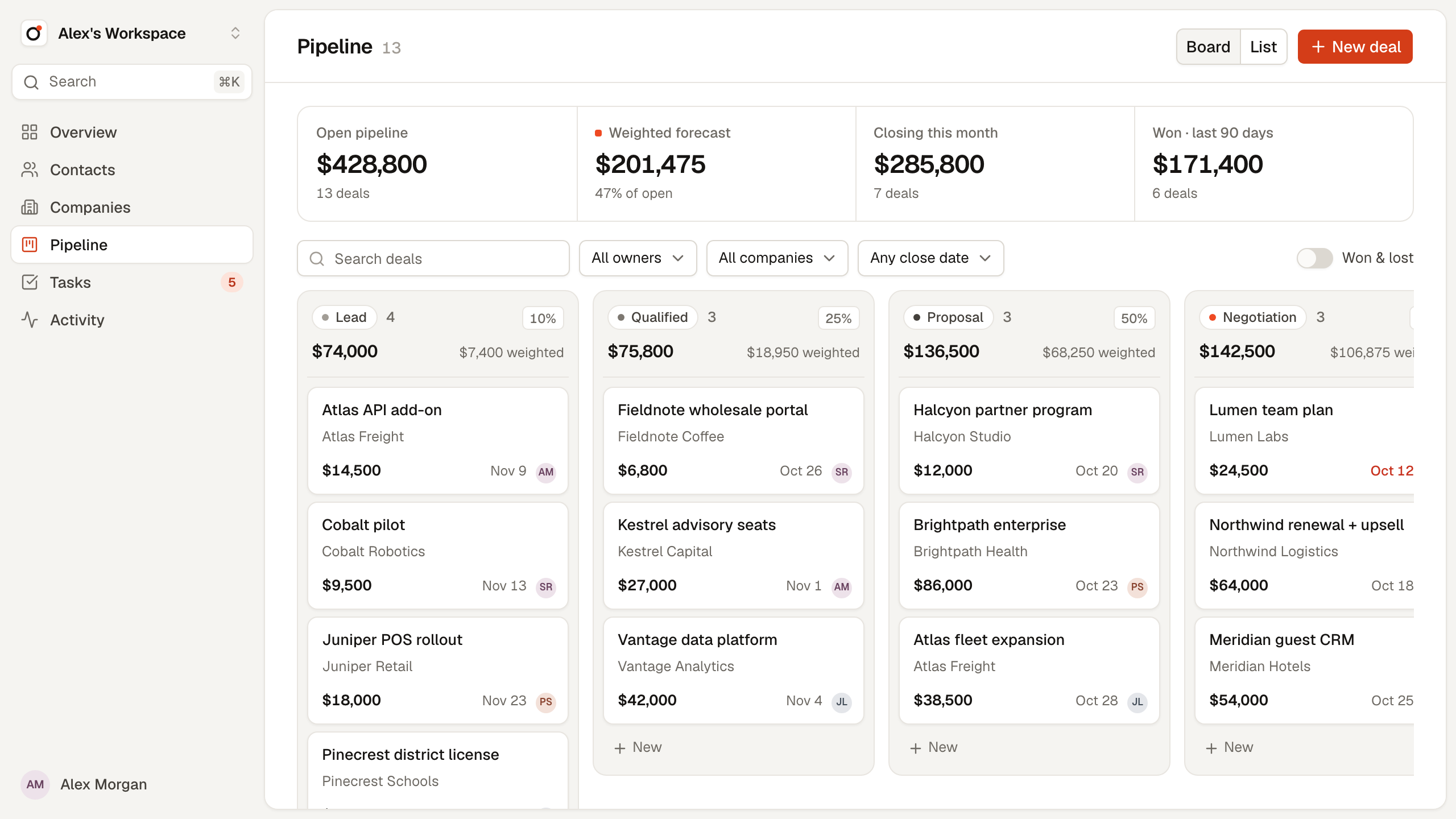
Every Layerwise project includes a production database, email authentication, app email, publishing to a *.layerwise.site address or a custom domain, analytics, and server logs. Project files stay on your computer, where you can open them in another editor or connect GitHub, and the template's source code is public. Running out of AI building credits does not pause a published app, though a database that reaches its storage limit can.
Access needs one decision up front. Orbit CRM gives each account its own private workspace and checks it on the server for every request, so a teammate who signs up starts with an empty workspace. Owner is a free-text name. A shared team pipeline, with members, invitations, and roles, is something you would add; the tutorial includes a prompt for it.
Trade-offs vs Pipedrive: You maintain the app, and each change uses AI credits, or your ChatGPT plan if you connect My Codex. Orbit CRM has no email or calendar sync, calling, workflow automations, reminders, file attachments, or integrations; calls, emails, and meetings are logged by hand. It works in US dollars only, and deals have no CSV import yet. Its sign-in is email-based. It is a web app that works at phone width, with no native mobile apps. The Layerwise desktop app must stay open while you build and publish, and your local preview and published app use separate databases.
Starting price: Free is $0 with one public project, $5 in monthly AI credits, and a 100 MB database, enough to try Orbit CRM yourself. Anyone with a public project's URL can sign up for a workspace of their own. Pro is $15/month ($150/year) per team, with private projects by default, up to 10 team members, custom domains, a 1 GB database per project, and $15 in monthly AI credits. Business is $30/month with unlimited members. Only your team can open a private project, so per-team pricing helps when your Layerwise team members are the CRM's users, each with a separate workspace until you add sharing. See Layerwise plans and personal software.
2. HubSpot: a free CRM that grows into a suite
Who it's for: Small teams that want to start free and may later add marketing or service tools on the same platform.
What it does well: HubSpot's free CRM has no expiration date and includes deal pipelines, contact management, email open notifications, meeting scheduling, and iOS and Android apps. The Sales Hub pricing page says the free plan covers up to 2 users and lists more than 2,000 apps you can connect.
Trade-offs vs Pipedrive: On the free plan, one-to-one email includes HubSpot branding, and you get one personal meetings link. Sales automation, with up to 50 workflows and restricted triggers and actions, starts on Starter, along with 500 calling minutes. Forecasting starts on Professional, at $90/seat/month billed annually, which also requires a one-time $1,500 onboarding fee. Like Pipedrive, paid plans are priced per seat.
Starting price: Free is $0 for up to 2 users. Starter is normally $20/seat/month. For a limited time, new customers pay $10/seat month to month or $7/seat with annual payment, according to HubSpot's Starter page.
3. Zoho CRM: automation on the free edition
Who it's for: Budget-conscious small businesses that want automation, calling, and calendar features at a lower per-user price.
What it does well: Zoho CRM's free edition is free forever for 3 users and includes contact management, follow-up reminders, workflow automation, standard reports, API access with 5,000 calls per day, and mobile apps. Standard adds Gmail and Outlook integration, built-in calling, multiple pipelines, calendar integration, sales forecasting, and Slack, Zoom, and Teams integrations. Zoho also offers migration assistance for teams switching CRMs.
Trade-offs vs Pipedrive: Paid plans are priced per user, as with Pipedrive. The free edition stops at 3 users, 10 custom email templates, and 10 data exports. Process management, CPQ, and unlimited reports start on Professional at $35/user/month, or $23 billed annually.
Starting price: Free is $0 for 3 users. Standard is $20/user/month, or $14/user/month billed annually.
4. Attio: records you define, with email and calendar sync
Who it's for: Teams that want to define their own objects, fields, and lists in a hosted CRM.
What it does well: Attio's pricing page lists real-time contact syncing and automatic data enrichment on the Free plan, along with email and calendar sync for one account per user, up to 3 objects, and 50,000 records. Plus adds private lists and enhanced email sending, and raises the limits to 5 objects and 250,000 records.
Trade-offs vs Pipedrive: Free allows up to 3 seats and 3 reports, and Plus caps at 10 seats. Call intelligence, sequences, advanced reporting, and advanced permission controls start on Pro at $99/user/month, or $79 billed annually. Access permissions are listed as none on Free and basic on Plus.
Starting price: Free is $0 for up to 3 seats. Plus is $44/user/month, or $35/user/month billed annually.
5. folk: a light CRM for relationship-driven sales
Who it's for: Small teams whose deals run through email, LinkedIn, and WhatsApp conversations.
What it does well: folk's Standard plan, according to its pricing page, includes pipeline management, email campaigns, contact enrichment, AI assistants, a LinkedIn extension, email, calendar, and WhatsApp sync, and 5,000+ integrations. Every plan lists CSV import and export, a mobile app, and Zapier and Make apps.
Trade-offs vs Pipedrive: folk has no free plan. Its 2-week trial blocks the account if you don't upgrade, though the data is not deleted right away. Premium adds custom objects and Deals, email sequences, workspace roles, dashboards, and API access, at $60/member/month or $48 billed yearly. Standard syncs one account per member.
Starting price: Standard is $30/member/month, or $24/member/month billed yearly.
6. Close: calling, email, and SMS built in
Who it's for: Inside sales teams that spend much of the day on calls and email.
What it does well: Close's pricing page lists built-in forms, email, calling, and SMS, a centralized inbox and task list, and unlimited contacts and leads on Essentials. Calling and SMS usage is passed through at cost: most outbound calls cost about $0.02 per minute, and phone numbers start at about $1/month. Every plan includes Chloe, Close's AI sales agent, with monthly AI credits.
Trade-offs vs Pipedrive: There is no free plan; Close offers a 14-day trial. Solo is limited to 1 user and 10,000 leads, and neither Solo nor Essentials includes workflows. Automated workflows, a power dialer, and bulk email start on Growth at $109/user/month, or $99 billed annually. Calling and SMS usage is billed on top of seats.
Starting price: Solo is $19/month for one user, or $9 billed annually. Essentials is $49/user/month, or $35 billed annually.
How to choose a Pipedrive alternative
Start with the gap you want to close:
- You want a free CRM for two or three people: HubSpot's free CRM covers 2 users, and Zoho CRM Free and Attio Free cover 3. Layerwise Free can run Orbit CRM as one public project.
- You want automation without moving up a tier: Zoho CRM includes workflow automation on its free edition.
- You want email and calendar sync: Attio includes it on every plan, and folk includes it on Standard. Zoho CRM Standard adds email and calendar integration. Orbit CRM does not sync email or calendars.
- Your team lives on the phone: Close builds calling, email, and SMS into its plans. Zoho CRM Standard and HubSpot Starter also include calling.
- You want to shape your own records: Attio lets you add objects to a hosted CRM.
- Your process doesn't fit any CRM, or you want to own the code and data: Start from Orbit CRM in Layerwise, and plan for the integrations and sharing you will add.
- You want to avoid per-seat pricing: Layerwise is priced per team, which helps when your Layerwise team uses the CRM as a private project.
- You want to keep using Pipedrive: If its pipeline, integrations, mobile app, and meeting intelligence fit your process and the seat count fits your budget, Pipedrive may still be the right fit. Check whether Growth covers the feature you would otherwise switch for.
Frequently asked questions
What is the best free Pipedrive alternative?
Pipedrive has no free plan, only a 14-day trial. HubSpot's free CRM covers up to 2 users with deal pipelines, email tracking, and mobile apps. Zoho CRM's free edition covers 3 users and includes workflow automation, and Attio Free covers 3 seats with email and calendar sync. Layerwise Free can run the Orbit CRM template as one public project.
Is there a Pipedrive alternative without per-user pricing?
HubSpot, Zoho CRM, Attio, folk, and Close all price paid plans per user, seat, or member. Layerwise prices plans per team: Pro is $15/month for up to 10 team members, and Business is $30/month with unlimited members. This helps when the CRM is a private project used by your Layerwise team. In the Orbit CRM template, each account has its own workspace, so a shared team pipeline is something you would add.
Can I build my own Pipedrive alternative?
Yes. Download Layerwise, open the Orbit CRM template, choose Use this template, and change your copy by describing what you want. It starts with a pipeline board, contacts and companies, record timelines, tasks, and a weighted forecast. How to Build a CRM with AI covers the data model, access rules, testing, and publishing. You maintain the app and add integrations such as email sync yourself.
How do I move my data from Pipedrive?
Pipedrive lets users with export permissions export data as Excel or CSV files, and global admins can export each item type from Tools and apps > Export data. Activities, notes, and files are exported separately. Orbit CRM imports contacts from CSV and reports any row that names a company not yet in the workspace. Deals have no import yet, and the CRM tutorial includes a prompt for adding one.
Which Pipedrive alternative has built-in calling?
Close includes calling, email, and SMS, with call usage passed through at cost. Zoho CRM includes built-in calling from Standard, and HubSpot Starter includes 500 calling minutes. Pipedrive's Lite plan has web-to-mobile calls, which finish a call on your phone and log it. Orbit CRM records only the calls you log by hand.
YOUR NEXT PROJECT
Give your idea a live URL.
Choose your model, build in a live preview, and publish with your project’s backend connected.
Download LayerwiseBuild your first app