Best Typeform Alternatives in 2026
Compare Typeform alternatives in 2026, including Layerwise, Tally, Google Forms, Jotform, Fillout, and SurveyMonkey, on response limits and pricing.
Table of contents
The right Typeform alternative depends on what you keep running into: the monthly response limit, a feature that sits on a higher plan, how many people need to work on your forms, or whether you want to own the form app and its data. This guide compares six options against Typeform, starting with Layerwise, which we make.
Typeform is a polished form builder. Its FAQ describes forms that ask "one question at a time like a real conversation," and its plans add AI form creation, webhooks and integrations, and response reports. For many teams, that is the right fit. Others hit the response limit early, need a feature from a higher tier, or want to pay in a different way.
Published by Layerwise. Layerwise is our product, so it appears first. Prices and features were checked against official sources on October 20, 2026. Availability varies by plan and region.
Why people look for Typeform alternatives
Typeform's pricing page and help center explain how its plans work. A few details lead people to compare:
- Every plan has a monthly response limit. The Free plan collects 10 responses per month across all your forms. Basic includes 100 responses a month, Plus 1,000, and Business 10,000, and Typeform's response limits article says unused responses don't carry over.
- Forms close when you reach the limit. At 100% of the limit, your forms go into Private mode until the next month begins or you upgrade. Deleting responses doesn't free up room. Paid plans can buy more responses or turn on auto-upgrade.
- Common features start on paid plans. Payment questions, file uploads, and partial responses start on Basic, at $39/month billed monthly. Removing Typeform branding starts on Plus at $79/month, and the pricing page lists custom domains for Enterprise only.
- Seats come with the tier. Basic includes 1 user, Plus 3, and Business 5. Typeform says multi-user accounts are not available on Basic.
Typeform notes that it experiments with pricing, so your account may show different plans. None of these is a problem for every team. If one matters to you, the options below package forms differently.
Typeform alternatives at a glance
| Tool | Best for | What stands out | Free plan | Starting paid plan |
|---|---|---|---|---|
| Layerwise | Owning a form app and its responses | Formpop template: one question at a time, conditional questions, themes | 1 public project, 100 MB database | Pro: $15/month per team |
| Tally | A generous free plan | Unlimited forms and submissions, payments, and webhooks on Free | Unlimited forms and submissions (fair use) | Pro: $29/month |
| Google Forms | Simple surveys for Google users | Responses in Google Sheets, branching by section | Free for personal use | Workspace Business Starter: $8.40/user/month |
| Jotform | Payments, uploads, and many integrations | Card Form layout and 200+ integrations | 5 forms, 100 submissions/month | Bronze: $39/month |
| Fillout | Teams that want unlimited seats | Logic, payments, and file uploads on Free; Typeform import | 1,000 responses/month, unlimited seats | Starter: $15/month, billed annually |
| SurveyMonkey | Survey research and analysis | One Question at a Time and Conversation formats, AI analysis | 10 questions per survey, limited responses | Standard Monthly: $149/month |
| Typeform (reference) | Conversational forms with built-in integrations | One question at a time, AI form creation, webhooks | 10 responses/month | Basic: $39/month |
Prices are monthly starting prices with monthly billing unless noted, checked on October 20, 2026. Google Workspace and SurveyMonkey team plans charge per user, and Typeform plans include a fixed number of seats. Layerwise, Tally, and Fillout list flat plan prices.
1. Layerwise: build your own form builder from the Formpop template
Who it's for: People whose forms don't fit a packaged tool, who want responses in a database they control, or who don't want a monthly response cap. Formpop's starter forms cover product feedback, contact forms, event RSVPs, research screeners, job applications, and team pulse checks.
What it does well: Formpop is a conversational form builder that asks one question at a time. Forms hold up to 50 questions across ten types, from short text and email to ratings, 0 to 10 scales, and yes/no. The editor has drag-and-drop ordering, questions that appear only after a matching earlier answer, six theme presets with custom colors, welcome and thank-you screens, and a live desktop and mobile preview.
Respondents answer by tap or keyboard without an account. Publishing saves a snapshot, so edits reach respondents only when you publish again. The Share tab copies the link, gives you an embed snippet, and has an Accepting responses switch. Owners get a Responses tab with search and CSV export, and an Analytics tab with views, starts, completions, and a summary of every question.
Answer a starter form in the live demo, or follow How to Build a Form Builder App with AI step by step. The source code is public on GitHub.
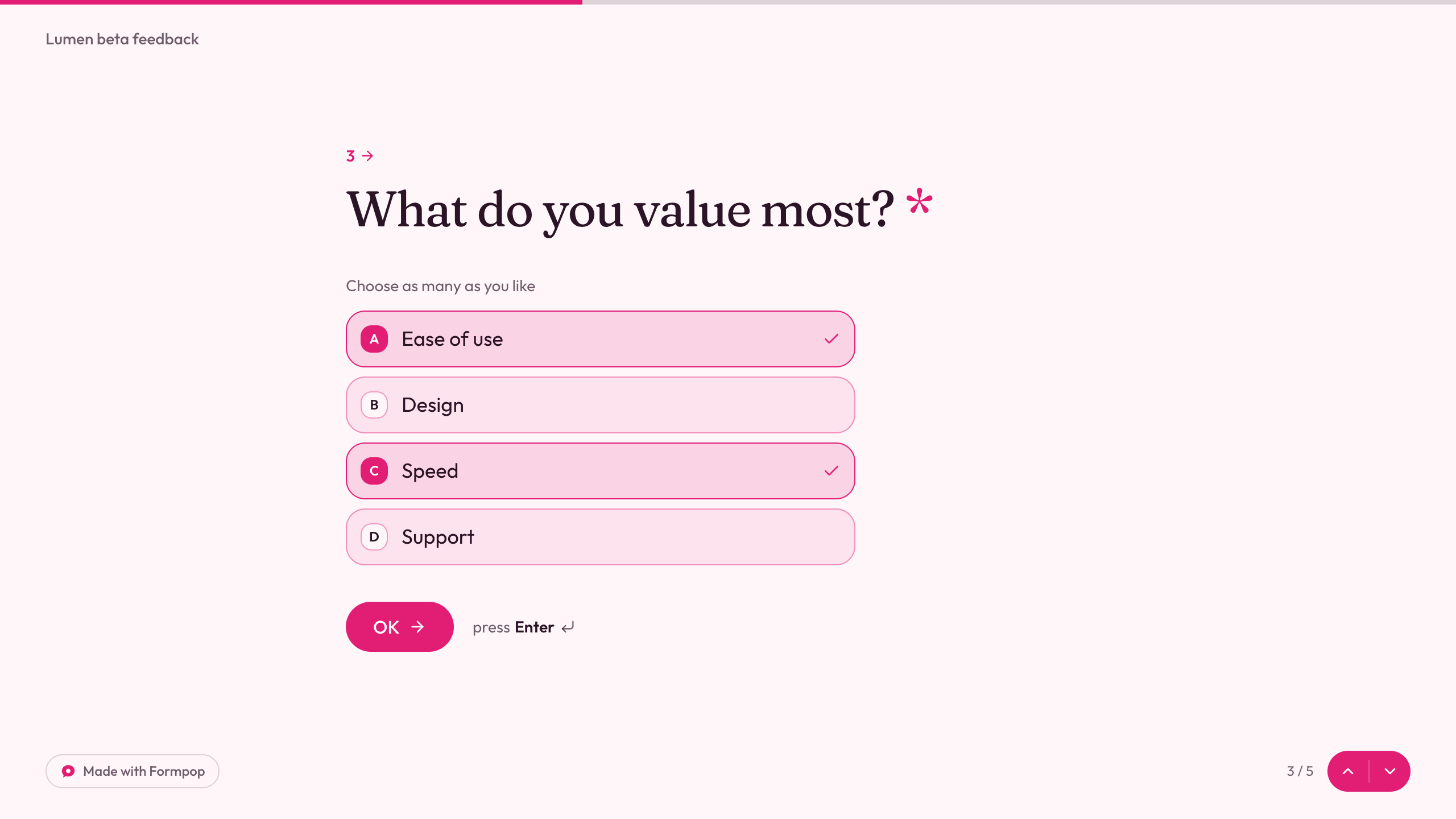
On the template page, Use this template opens Layerwise and copies Formpop into a project on your team. Then you describe changes in chat, and the assistant edits the project files on your computer while you check them in a local preview. Every project includes a production database, Storage, email authentication, app email, publishing, analytics, and server logs.
Formpop sets no limit on how many responses a form collects. Responses live in the project's database, which is 100 MB on Free and 1 GB per project on Pro; a database that reaches its limit pauses the published app until you free up space or upgrade. Plans are priced per team, so inviting a teammate adds no seat fee.
Trade-offs vs Typeform: You own the app, so you also maintain it, and each change uses AI credits or your ChatGPT plan through My Codex. Formpop has no file uploads, payments, teams, or external integrations such as webhooks, Zapier, or Google Sheets. It doesn't save partial responses, email you when a response arrives, or import Typeform forms. It also has no CAPTCHA, rate limit, or closing date, so add limits before you link a form from a busy public page.
Form owners sign in with email. Layerwise builds web apps only, with no native mobile apps, and the desktop app needs to stay open while you build and publish. New projects on paid plans start private, so turn off Private before you share a form.
Starting price: Free is $0 with one public project, $5 in monthly AI credits, up to 10 messages a day, a 100 MB database, and a Layerwise badge; respondents can answer a public project's forms. Pro is $15/month ($150/year) with $15 in monthly AI credits, custom domains, a 1 GB database per project, up to 10 team members, and no badge. Business is $30/month with a 10 GB database per project and unlimited members. Running out of AI credits doesn't pause a published form. See Layerwise plans.
2. Tally: unlimited forms and submissions for free
Who it's for: People who want a free plan without a response cap.
What it does well: Tally's pricing page lists unlimited forms and submissions on Free within its fair usage guidelines. Free also includes payments, file uploads, conditional logic, closing a form on a limit or date, and integrations with Google Sheets, Notion, Airtable, Zapier, and Make, plus webhooks.
Tally's Typeform importer is free and rebuilds question types, answer options, welcome and thank-you screens, multi-page structure, and conditional logic.
Trade-offs vs Typeform: To get Typeform's one-question flow, Tally's comparison page says to add a new page after each question. The importer moves form structure without past submissions, and logic needs a check after import because Typeform's logic jumps don't always map one-to-one. Removing Tally branding, custom domains, partial submissions, and team collaboration require Pro, and Free limits uploads to 10 MB per file.
Starting price: Pro is $29/month or $290/year, according to Tally Pro, and includes unlimited team members.
3. Google Forms: free surveys connected to Sheets
Who it's for: People who already use Google accounts and need straightforward surveys, quizzes, or sign-up forms.
What it does well: Google lists Forms as free for personal use on its Forms page. You can customize colors, images, and fonts, add logic that shows questions based on answers, and see charts that update in real time. Raw data opens in Google Sheets, collaborators can edit and analyze together, and forms can be embedded on a website.
Trade-offs vs Typeform: Questions are grouped into sections, and branching sends respondents to a section with Go to section based on answer, which works only with Multiple choice and Dropdown questions. Respondents must sign in to a Google Account to answer a file upload question, and uploaded files go to the owner's Google Drive.
Starting price: Free with a personal Google account. Paid Google Workspace plans are priced per user: Business Starter is $8.40/user/month on the Flexible plan, or $7/user/month with an annual commitment, according to Google's plan comparison.
4. Jotform: payments, uploads, and many integrations
Who it's for: Teams that collect payments and files and want a large catalog of integrations.
What it does well: Jotform's Card Form layout gives "a more interactive, one-question-per-page experience," and existing forms can switch to it. The pricing page says the free Starter plan includes standard features such as form templates, payment integrations, and widgets. Jotform lists 200+ integrations, including Google Sheets, Salesforce, HubSpot, Stripe, PayPal, and Slack.
Trade-offs vs Typeform: Some fields aren't supported in both layouts, so check your questions after switching to Card. Starter allows 5 forms, 100 submissions a month, and 100 MB of upload space, and its forms include Jotform branding until you upgrade. Jotform's FAQ calls Enterprise its only multiuser plan, and it lists custom domains on Enterprise.
Starting price: Bronze is $39/month billed monthly, or $408/year, with 1,000 monthly submissions, 25 forms, and 1 GB of upload space.
5. Fillout: a large free plan with unlimited seats
Who it's for: Teams where several people build and review forms, and that want logic and payments without paying for a higher tier.
What it does well: Fillout's pricing page says "No per-seat charges." Free includes unlimited forms and seats, 1,000 responses a month, multi-page forms, embedding, payments, conditional logic, calculations and scoring, pre-fill and hidden fields, and unlimited file uploads up to 20 MB each.
Fillout can import your Typeform forms after you connect your account, including labels, multiple-choice options, workflows, and email notification settings. Backend settings aren't included.
Trade-offs vs Typeform: Fillout has no one-question-per-page switch. Its guide puts each question on its own page and uses Auto-jump to the next page to move respondents forward. Free forms carry a Fillout badge, Starter shows light branding, and Pro removes it. Custom domains and partial submissions start on Business, at $75/month billed annually.
Starting price: Starter is $15/month billed annually ($180/year), with 2,000 responses a month.
6. SurveyMonkey: survey research and analysis
Who it's for: Teams running research studies or ongoing feedback programs.
What it does well: SurveyMonkey offers three survey formats: Classic, One Question at a Time, and Conversation, which displays a survey like a chat. Its individual plans add data exports and 200+ integrations on Standard, and statistical significance, multi-survey analysis, and AI analysis on Advantage. The free Basic plan includes limited skip logic and payments.
Trade-offs vs Typeform: The free Basic plan allows 10 questions per survey and a limited number of responses per survey, shown after you sign up. On paid plans, each response over the limit costs $0.15. Each collaborator needs a seat, and team plans start at 3 users, from $30/user/month billed annually.
Starting price: Standard Monthly is $149/month for 1 user and 1,000 responses a month. Advantage Annual is $39/month, billed $468 annually, with 15,000 responses a year.
How to choose a Typeform alternative
Start with the limit or feature that sent you looking:
- You want a free plan without a response cap: Tally offers unlimited submissions within fair use. Fillout's free plan includes 1,000 responses a month. Formpop on Layerwise has no response limit; the project's database size is the ceiling.
- You want the one-question-at-a-time feel: Formpop works that way by default. Jotform's Card Form and SurveyMonkey's One Question at a Time format are settings, and Tally and Fillout get there with a page per question.
- You collect payments or files: Tally, Fillout, and Jotform include both on their free plans, and Typeform starts both on Basic. Formpop includes neither.
- Several people work on forms: Fillout charges no per-seat fees, Tally Pro includes unlimited team members, and Layerwise prices plans per team.
- Responses need to reach other tools: Typeform, Jotform, Tally, and Fillout connect to Google Sheets and other apps, and Google Forms uses Sheets directly. Formpop has none built in.
- You want to own the app and the response data: Start from Formpop in Layerwise and change it in chat.
- You need survey analysis: SurveyMonkey adds statistical significance and AI analysis on its paid plans.
- You want to keep using Typeform: If your volume fits a tier and you rely on its integrations, AI features, or polished conversational forms, Typeform may still be the right fit.
Frequently asked questions
What is the best free Typeform alternative?
Tally offers unlimited forms and submissions on its free plan within fair use, including payments, file uploads, conditional logic, and webhooks. Fillout's free plan includes 1,000 responses a month with unlimited seats, and Google Forms is free for personal use. For comparison, Typeform's Free plan collects 10 responses a month across all forms.
Is there a Typeform alternative without per-user pricing?
Yes. Fillout says it has no per-seat charges, Tally Pro includes unlimited team members, and Layerwise prices plans per team, with up to 10 members on Pro and unlimited members on Business. Google Workspace and SurveyMonkey team plans charge per user.
Can I build my own Typeform alternative?
Yes. Layerwise's Formpop template is a conversational form builder with conditional questions, themes, an embed code, CSV export, and analytics, and you change it by describing what you want. A public project works on the Free plan, and respondents don't need an account. File uploads, payments, and integrations are not included.
Can I move my Typeform forms and responses to another tool?
Typeform lets you download responses in XLSX or CSV format. Tally and Fillout both import Typeform forms; Tally's importer moves the structure without past submissions, so export responses first and check logic afterward. Formpop has no importer, so you recreate your questions in its editor.
What happens when a Typeform form reaches its response limit?
When you reach 100% of your monthly limit, Typeform puts your forms into Private mode until the next month begins or you upgrade. Deleting responses doesn't restore the allowance. On paid plans, you can buy more responses or turn on auto-upgrade to keep collecting.
YOUR NEXT PROJECT
Give your idea a live URL.
Choose your model, build in a live preview, and publish with your project’s backend connected.
Download LayerwiseBuild your first app